
Lesson video
Narration is AI-generated. Video chapters, transcript and sources
Transcript
Transcript
UNIT-01 asks
Write a few dozen lines of text, and a cup inside the computer just falls on its own? This episode, we build a grasping scene in MuJoCo from a page of XML. Then we make it move, one step at a time.
Describing the world in XML
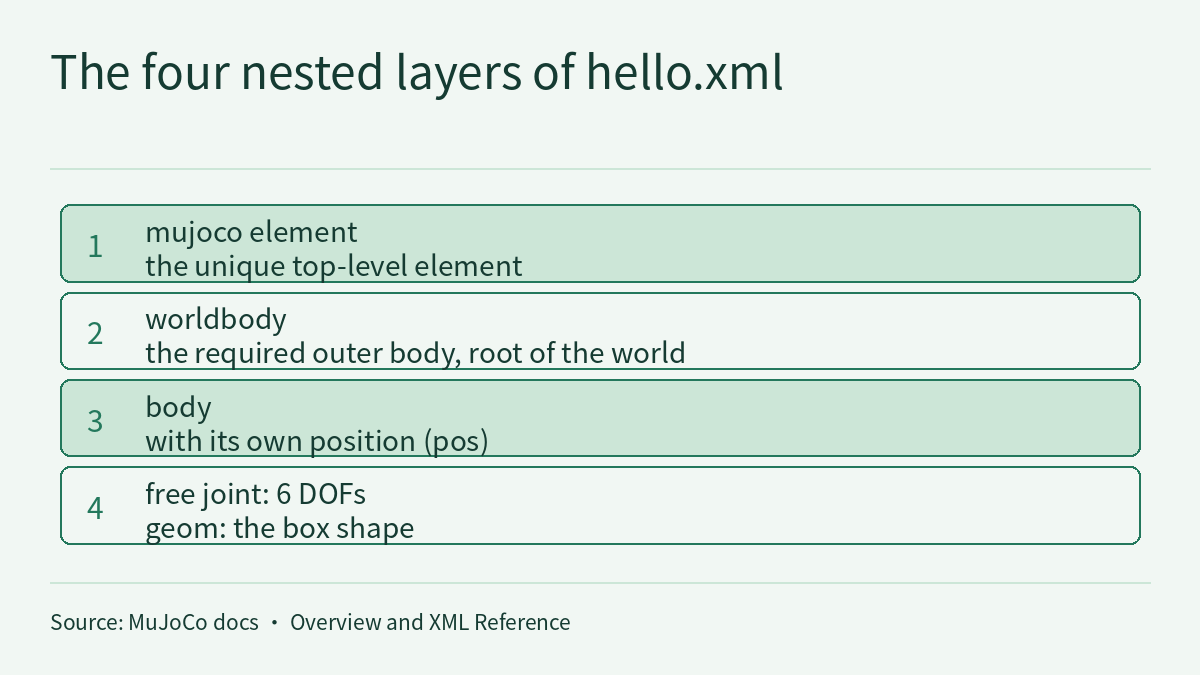
MuJoCo stands for multi-joint dynamics with contact. It's a physics engine. It reads XML and builds the world. The outer layer is worldbody, the root of the world. Inside it go bodies, and each body carries geoms, its shapes. Each body has a position and orientation. The table sits in the middle, the cup just a little above it. Our world has only three things: a table, a cup, and a two-finger gripper. There are several kinds of geom: plane, box, sphere, capsule, cylinder, and mesh. The table is a box, the cup a cylinder. Meshes, textures and the like are called assets. The model refers to them, say, to give the table a wood grain. The cup is attached to the world by a free joint. It can slide and turn, six degrees of freedom, so it falls. MuJoCo has four kinds of joint. Ball, slide, hinge, and this free joint. A neat part: the mass is optional. MuJoCo infers it from volume, using water's density by default: a thousand kilograms per cubic meter. Then there's gravity. By default, MuJoCo's gravity points straight down. Nine point eight one meters per second squared, roughly Earth's surface gravity. By the way, MuJoCo doesn't fix the units. Pick your own set and keep it consistent. We use meters, kilograms and seconds. A geom can have a color and a material. But that only changes how it looks. What the physics uses is shape and contact. You can also add marker points and sensors. A touch sensor, for example, reads the normal force of a contact. Force and torque sensors read the force and torque at a marker point. Contact is soft. Solref controls the time scale and damping ratio. Solimp controls constraint impedance. Repeated attributes can go into a default class. They're inherited like CSS on a web page, so you don't write them every time. So building a world means saying what's in it, how it connects, and how heavy it is.
Stepping the physics
A finished world splits in two. The part that never changes is mjModel. The state that keeps changing is mjData. The state is just two vectors: position, qpos, and velocity, qvel. Physics means updating these two, again and again. Before stepping, don't forget an initial state. Where the cup sits, how fast it moves, it all starts here. To compute forces without moving time, call M J forward. It refreshes the state, but the clock stands still. To actually move forward, one function: M J step. Each call moves time forward by one step. The default time step is two milliseconds. The docs call it a speed-accuracy trade-off: smaller is more accurate and more stable, but slower. The default is semi-implicit Euler. Fourth-order Runge-Kutta suits smooth dynamics. This notebook uses implicit fast. To start over, one call to M J reset data puts the state back at the start. Or jump straight to a keyframe. For a small model like this, MuJoCo is usually faster than real time. But with lots of contacts, it slows down. Now drop the cup from above the table. Let go, and it falls, hits the table, bounces once, and settles. When the cup touches the table, there's contact. MuJoCo solves the contact forces as a convex optimization problem. Every contact point can be read: position, normal direction and force. N con is the current number of contacts. One trap: by default, a parent and its child body don't collide with each other. The table is static, and the cup still hits it. If the cup won't settle and the numbers blow up, the time step is likely too big, and the physics diverged. A smaller time step usually fixes it. Your turn. In the notebook, step again and again. Plot the cup's height as a curve. The curve shows it clearly. First it falls, then it hits, bounces once, and finally rests at table height. So a physics engine computes the laws, one tiny step at a time!
Grasping
A cup alone isn't enough. We need a hand that moves. Give the gripper two fingers, and its base a vertical slide rail. The two fingers are really just two small boxes. They sit on slide joints, opening and closing. Each finger gets a position actuator. Give it a target position, and it pushes hard to get there. The control signal is written into data dot ctrl. Add a ctrl range, and the fingers won't open too far. Before grasping, the gripper moves to either side of the cup, lined up with its center. If it's off, the fingers close on nothing. The grasp script has two steps. Step one, close the fingers on the cup. Step two, lift the base. Why can the fingers hold on? Friction at the contact points. The harder they squeeze, the more they can lift. Flat fingers slip easily. Raise the friction, or raise the contact dimension, so even twisting is blocked. Once closed, the base lifts. If the grip is tight enough, the cup leaves the table with it. The simplest possible grasp. Put a touch sensor on a finger, and you can read how tight the grip is. If the number is too small, it's about to slip. Did it work? Look at two curves. One is finger position, one is cup height. If the cup rises, it's grasped. You can also render the scene to images. MuJoCo supports offscreen rendering, color and depth. If that won't run, just keep the curves. What's a depth image for? Later, when we train a vision policy, it makes a perfect input. Look, the cup really got lifted! But this grasp is a script we wrote by hand. Move the cup, and it needs tuning again. What we really want is a model that learns on its own. Let's recap, three points. One, MuJoCo describes the world in XML. Two, M J step advances the physics, step by step. Three, add actuators and a script, and you can try a grasp. Building a moving world from scratch is this quick! We have a scene. Now how does a robot learn to act on its own, from data? See you next time!
Evidence and sources
Practice and self-check
- Interactive quiz5 questions, explained as you answer
- One-page summaryprintable; opens in a new tab
- Download the notebookszip in Chinese, English and Japanese; run in Jupyter or upload to Colab
The quiz is public and explains each answer as you go; answers to the guide's exercises are for signed-in members.
The episode 2.1 video builds a grasping scene from a page of MJCF, MuJoCo’s XML model format: a table, a cup and a two-finger gripper. It makes three points. MJCF describes the world with worldbody, body, geom and joint. mj_step advances the physics one step at a time, and the default timestep of 0.002 seconds is a speed-accuracy trade-off. Add position actuators and a “close, then lift” script, and you can try a grasp, judged by two curves: finger position and cup height. The episode’s three number cards all come from the official MuJoCo documentation: a default timestep of 0.002 seconds, default gravity of 9.81 and a default density of 1000. This page is the episode’s reading and exercises. Rather than repeat the transcript, it answers a question the video only touches on: why are a few dozen lines of XML enough? Because many values are not written, yet they are not missing; they take defaults. This lesson fills those defaults in one by one, works out with a hypothetical cup what they mean in mass, speed and number of steps, and then looks at two rules the documentation states but readers easily overlook: divergence is not always the timestep’s fault, and the rule that parent and child bodies do not collide has exceptions. One rule runs through the whole page: you have only read a model once you can write out every value the XML leaves unwritten, together with the units it assumes.
The video, transcript and sources for this lesson are at the top of this page; the season plan is in the course outline. This is the first episode of L2, the hands-on level. The previous lesson, Physical AI Lab 1.8: Evaluation — Splitting a “Net Gain of 2” into a Paired Table, Then Checking the Failure Labels and Random Seeds, ended by asking whether you would like to build a grasping scene in simulation yourself. This lesson picks up there. How a smaller timestep increases the amount of computation, and how different engines’ contact approximations make two trajectories split apart, were covered in Physical AI Lab 1.4: A Map of Simulators — Counting the Cost of the Timestep, Finding Where Contact Splits Two Runs, and Pinning Three Speed-ups to Their Baselines. How much force two fingers need to hold a cup by friction was worked out by hand in Physical AI Lab 1.3: Sensors — Working Out Pixels, Depth Range and Grip Force for One Cup. This lesson does not repeat them; it covers only the passages of the MuJoCo documentation that bear directly on this episode.
The public quiz’s 5 questions come with full explanations. Signed-in readers can work through three exercises: fill in the mass and weight of a fictional cup, then review a model whose lengths were changed to centimetres while keeping the default gravity and density; read a fictional drop log and decide whether a divergence comes from the timestep or from initial penetration; and judge collisions pair by pair in a fictional gripper’s body tree, then review four grasp records. Each comes with a step-by-step solution, common mistakes and a 20-point rubric.
1. The values hello.xml does not write
The Overview chapter of the MuJoCo documentation gives a minimal MJCF example, hello.xml. According to the text, it defines a plane fixed to the world, a light, and a floating box with 6 DOFs, which is what the “free” joint does; when the model is simulated, the box falls on the ground. Here is the original file from the documentation:
<mujoco>
  <worldbody>
    <light diffuse=".5 .5 .5" pos="0 0 3" dir="0 0 -1"/>
    <geom type="plane" size="1 1 0.1" rgba=".9 0 0 1"/>
    <body pos="0 0 1">
      <joint type="free"/>
      <geom type="box" size=".1 .2 .3" rgba="0 .9 0 1"/>
    </body>
  </worldbody>
</mujoco>
These 10 lines contain no mass, no gravity, no timestep and not a single collision rule. The documentation explains why when it discusses a longer example that follows. The two sentences below are separate excerpts:
Inertial properties are inferred from the geom shape under a uniform density assumption.
Collision rules are defined automatically. Friction properties, gravity, simulation time step etc. are set to their defaults.
The three defaults behind the episode’s number cards are stated as follows, each excerpted separately. The first comes from the option section of the XML Reference; the other two come from the “Units are unspecified” section of the Overview:
timestep : real, “0.002” Simulation time step in seconds. This is the single most important parameter affecting the speed-accuracy trade-off which is inherent in every physics simulation.
The default value of gravity is (0, 0, -9.81), which corresponds to Earth surface gravity in MKS.
The default value of geom density (used to infer body masses and inertias) is 1000, which corresponds to the density of water in MKS.
| Unwritten value | Default | Element it belongs to | What else the documentation says | What the sentence does not say |
|---|---|---|---|---|
| Timestep | 0.002 s | timestep on option | Smaller is more accurate and more stable; for real-time performance the timestep must be larger than the CPU time per step | What timestep a given model should use; the documentation says stability also depends on the solver parameters and recommends tuning both together |
| Gravity | (0, 0, −9.81) | gravity on option | Corresponds to Earth surface gravity in the MKS system | It does not oblige you to use MKS; in the documentation’s words, we might be using CGS on Enceladus |
| Mass and inertia | Inferred from the geom’s shape and a density of 1000 | density on geom (mass is also in the attribute list) | 1000 corresponds to the density of water in MKS; inertia is inferred under a uniform-density assumption | It computes the mass of a solid object and does not know the cup is hollow |
| Collision rules | Defined automatically | Not written | Collisions between bodies in a direct parent-child relationship are excluded by default, except for a static parent (see section 4) | The quoted text does not go into other filtering mechanisms |
All three number cards are level O (official, first-hand): they are the MuJoCo documentation’s description of its own software, and this site has not run MuJoCo to check them. This lesson reads the stable documentation fetched on 2026-10-12; the episode’s number cards are labelled v3.14.0, and the documentation changes between versions.
Where the values live after compilation. The Overview says MJCF is compiled by the built-in compiler into the low-level data structure mjModel. mjModel holds the model description and is expected to remain constant; mjData holds all dynamic variables and intermediate results and is constructed at runtime, given mjModel. The XML Reference adds that the option element corresponds one-to-one to the mjOption structure in the field mjModel.opt. So the timestep and gravity end up in mjModel, while where the cup is right now, and how fast it moves, is in mjData. The documentation also states that these options may be changed before each simulation time step, but should not be changed within a time step. The shortest simulation loop in the documentation is a single line:
while (d->time < 10) mj_step(m, d);At the default timestep, this line calls mj_step about 10 ÷ 0.002 = 5000 times (this lesson’s arithmetic). In the video, the table is a box, the cup is a cylinder and the cup is attached by a free joint: an enlarged version of the way hello.xml is written.
Sign in to keep reading: the rest of this lesson, its self-check questions and the answers.
Limitations
- The 0.002 s timestep, the (0, 0, −9.81) gravity, the density of 1000, the real-time condition, the divergence diagnosis and the parent-child collision rule all come from the official MuJoCo documentation (Overview and XML Reference) and are level O. This lesson reads the stable version fetched on 2026-10-12; the episode’s number cards are labelled v3.14.0. This site has not run MuJoCo to check any of them.
- This lesson relies on excerpts from the two documentation pages. They do not include how a geom’s size converts to dimensions, what the solver parameters (solref, solimp and others) mean in detail, the Collision detection section, or other filtering mechanisms such as contype and conaffinity; the “Surprising Collisions” section was not read to the end in the excerpt. “With RK4 it must be more than 4 times larger” is this lesson’s literal reading of the sentence in brackets in the documentation.
- The cup dimensions, tabletop height, 0.03 m, the CPU times of 0.1 ms and 0.6 ms, z = 0.440 m and so on in sections 2 and 3 are this lesson’s assumptions; 0.503 kg, 4.93 N, 0.0782 s, step 40, 20 times, about 3.3 times, 5000 calls and so on are this lesson’s arithmetic. The free-fall estimates ignore discrete integration, soft contact and air, and are not MuJoCo output.
- Section 5’s cup C, the centimetre and millimetre files, the wood density of 600, runs A–C, the body tree, the actuator and control-range settings, the touch readings, G1–G4 and the teammate’s report are fictional, for practice only; the computed 0.339 kg, 589 kg/m³, 33.3 N, 0.0639 s, 0.800 m and so on hold only under these assumptions. The order of diagnosis and the three-question check are this lesson’s arrangement of the documentation; the rubric is a teaching suggestion.
- This page has not checked the implementation or data of the episode’s notebook, interactive scenes or curves. The grasp in the video is a handwritten script; a grasp that works in simulation is not thereby safe or reliable on a real robot, and neither paper calculation nor simulation results are a hardware safety validation.
Links
- Physical AI Lab: a physical AI course where every number can be checked (course outline)
- Physical AI Lab 1.8: Evaluation — Splitting a “Net Gain of 2” into a Paired Table, Then Checking the Failure Labels and Random Seeds
- Physical AI Lab 1.4: A Map of Simulators — Counting the Cost of the Timestep, Finding Where Contact Splits Two Runs, and Pinning Three Speed-ups to Their Baselines
- Physical AI Lab 1.3: Sensors — Working Out Pixels, Depth Range and Grip Force for One Cup
- Carrying an accepted CAD part into a robot arm simulation: mass checks and portable MJCF and OpenUSD exports
- MuJoCo documentation · Overview (hello.xml, separation of model and data, units, divergence and parent-child collisions)
- MuJoCo documentation · XML Reference (timestep on option)