Lesson video
Narration is AI-generated. Video chapters, transcript and sources
Transcript
Transcript
UNIT-01 asks
With its eyes closed, can a robot pick up a cup of water without spilling it? Over the last two episodes, the robot worked out its angles and steadied its motors. But first, it has to see the world. This episode: sensors.
Cameras: colour and shape
The most common sensor is the camera. It captures colour and shape, and picks out which one is the cup. Cameras are cheap and mature, and many robots have one. They're a robot's main pair of eyes. The colour camera on one depth camera has twelve million pixels. Rich in detail, with clear colour. But colour alone has a big problem. A photo is flat. It can't tell how far the cup really is from the hand. It knows the cup, but it can't reach it. Colour alone still lacks distance!
Depth: a distance for every pixel
So we have depth cameras. They give every pixel a distance. Like giving a photo a third number. On that same device, the depth stream has one million pixels. Every point tells you how far away it is. Interestingly, the depth stream is often coarser than the colour one. Enough to see outlines; it doesn't need to be that fine. How do you measure distance? One way is like our own two eyes. Two lenses look at the same spot, compare how much the views shift, and work out the distance. Another way is to send out a beam of light and time its round trip. From far away, it comes back later; up close, sooner. With distance, the robot can finally work out where to reach, how wide to open, and when to close. But depth has weak spots too. Too close, too far, or something shiny, and it can't measure, leaving a hole behind. So a depth camera turns a flat photo into one with distance!
Force and touch: after contact
Seeing it doesn't mean touching it well. Once the hand touches the cup, it needs another kind of sensor: force. A six-axis force sensor can tell which way it's pushed or twisted: forward and back, left and right, up and down, plus twisting in three directions. In one force-controlled arm, every joint hides a torque sensor. Even a gentle touch gets noticed. With force, the robot knows whether its grip is secure. Grip too hard, and the cup breaks. Too loose, and it drops. Force is the sense of just right. Finer still is touch. One kind of touch sensor has a soft gel pad, with a tiny camera hidden behind it. Every pattern pressed into the gel shows up crystal clear on camera. Is it slipping? Is the texture rough? It can feel it all. Say something in its grip starts to slide. Touch can notice early. The hand quickly squeezes a bit tighter.
Proprioception: knowing where it is
One more kind is the easiest to forget: it's proprioception. The robot's sense of itself: where each joint has turned to. Working out angles, then correcting them: the last two episodes relied on this. The joints' own encoders, without looking outside, still know the pose. So robots don't just use their eyes. They touch, they feel the weight, and they know where they are! In real work, these senses work together. Eyes find the cup, depth gives distance, force handles how hard. Proprioception reports where it is. Remember one thing: one sensor sees one side of the world. Put together, they make the whole picture. Open this episode's page. In the same cup-grabbing scene, you can flip between several sensor views. Switch to depth, and the cup pops out. Switch to force: the moment it touches, the force bar jumps up. Then switch to touch, and watch the cup's texture print into the gel pad. At the same moment, each sensor sees something different. No sensor is perfect. Cameras struggle in the dark, depth with shiny things, force with noise. So they need calibrating, and checking against each other. Let's recap, three points. One: cameras see colour and shape, but can't tell near from far. Two: depth gives every pixel a distance; force and touch handle contact and grip. Three: there's also proprioception, so the robot knows where it is. So carrying water blind is just too hard. A robot has to look, measure, and touch! So many sensors, so much trial and error. Real robots are too slow for that. Where can they practise? See you next time!
Evidence and sources
Practice and self-check
- Interactive quiz5 questions, explained as you answer
- Browser labno install: drag and tune it yourself
- One-page summaryprintable; opens in a new tab
The quiz is public and explains each answer as you go; answers to the guide's exercises are for signed-in members.
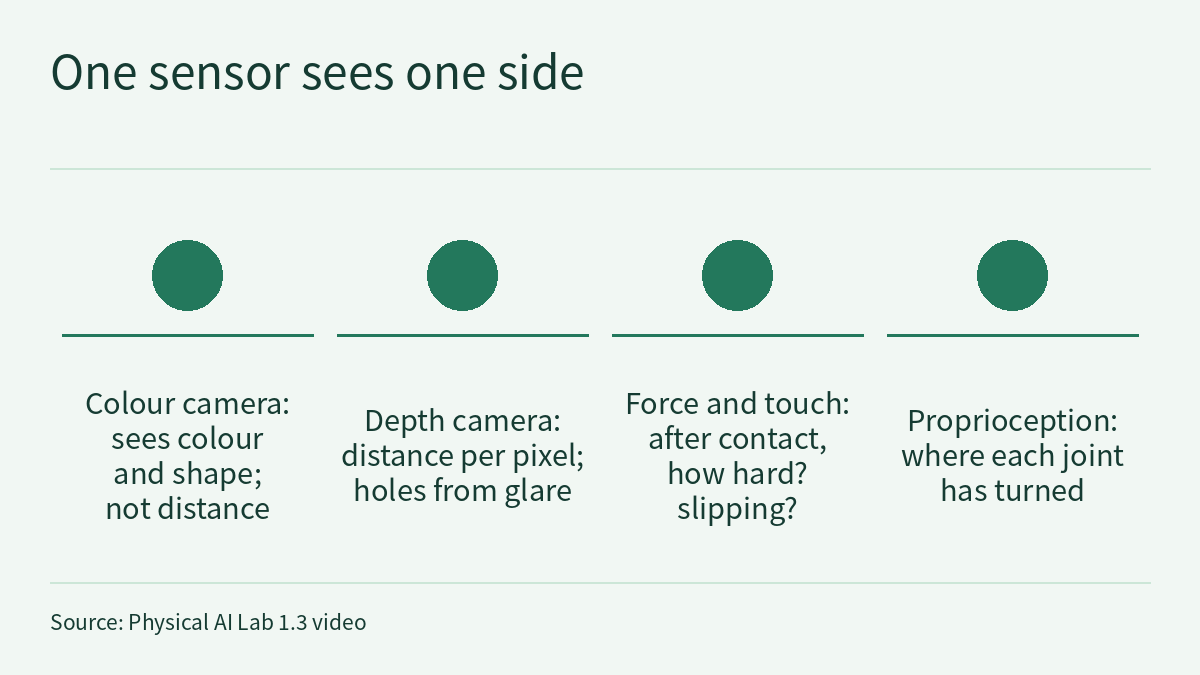
The episode 1.3 video asks whether a robot could pick up a cup of water with its eyes closed, and uses that question to cover four kinds of sensors: a colour camera recognises the cup but cannot tell how far away it is; a depth camera gives every pixel a distance; force and touch handle how hard the hand grips and whether the cup slips after contact; and proprioception tells the robot where each of its joints has turned to. The video cites three pieces of evidence: the colour camera on one depth camera (Microsoft Azure Kinect DK) has 12 million pixels and its depth camera about 1 million, and one force-controlled arm (Franka Research 3) has a torque sensor built into every joint. This page is the episode’s reading and exercises. Rather than repeat the transcript, it goes back to the two vendor documents. It turns “12 million” and “1 million” into the actual image sizes of each operating mode, and works through a hypothetical cup by hand: how many pixels it covers, whether it falls inside the depth range, and how large the stated error bounds are. It then sets out how far “joint torque sensors estimate contact force” actually goes, and ends with a hand calculation of how hard the fingers must squeeze to hold the cup. One rule runs through the whole page: a number belongs only to the device, mode and conditions that produced it.
The video, transcript and sources for this lesson are at the top of this page; the season plan is in the course outline. The previous lesson, Physical AI Lab 1.2: PID and Control Rate — Computing the Three Terms by Hand, Then Turning Rates into Periods, ended by saying that before a robot can correct an error, it has to measure accurately. This lesson picks up there: what does a robot measure with? Physical AI Lab 1.1: Coordinate Frames and Kinematics — Working Out by Hand How a Two-Link Arm Reaches the Cup showed how to move a camera reading into the base frame, and Physical AI Lab 0.3: See, Think, Act — Putting Each Rate Back in Its Own System showed that “seeing” covers both the world and the robot itself. The 7 degrees of freedom used in 1.1 and the 1 kHz used in 1.2 also come from the Franka Research 3 product page; this lesson uses only the sentences on that page about torque sensors.
The five public quiz questions come with full explanations. Signed-in readers get three exercises: choose a depth mode for each of three distances under fictional constraints, and answer “more pixels is better” with numbers; predict from a fictional grasp log when slipping starts, judge what the depth, encoder and touch readings can each show, and set a new grip force; and review a fictional sensor plan that splices together two vendors’ specifications. Each comes with a worked solution, common mistakes and a 20-point rubric.
1. Three pieces of evidence and what each one says
Two come from Microsoft’s hardware specification page. The Azure Kinect DK hardware specifications page (marked as last updated on 2021-03-18) says:
Azure Kinect DK includes an OV12A10 12MP CMOS sensor rolling shutter sensor.
Azure Kinect DK integrates a Microsoft designed 1-Megapixel Time-of-Flight (ToF) depth camera using the image sensor presented at ISSCC 2018 .
One comes from Franka Robotics’ product page. The Franka Research 3 page says:
The torque sensors integrated at each joint finely estimate external contact forces, and the fast control loop enables prompt reaction to collisions.
Three points to keep in mind when reading these sentences:
- All three are vendor statements. Under the course’s grading they are level O: Microsoft and Franka Robotics describing their own products. This site has not measured any of them independently.
- They describe sensors, not every image frame. “12MP” describes the colour image sensor, and “1-Megapixel” describes the depth camera. The same page lists the resolution of each operating mode, so the size of the image you actually get depends on the mode you choose. Section 2 works through each one.
- Two companies, two devices. The video says “one depth camera” and “one force-controlled arm”; they are not parts of the same robot. The resolutions, frame rates and control rate in the two documents each belong to their own device. They cannot be combined into the specification of one robot, or compared to decide which is faster.
Sign in to keep reading: the rest of this lesson, its self-check questions and the answers.
Limitations
- The Azure Kinect DK sensor pixel counts, operating modes, ranges, error figures and factory calibration all come from Microsoft’s specification page; the Franka Research 3 joint torque sensors, FCI measurements and field calibration all come from Franka Robotics’ product page. All are level O vendor statements, and this site has not measured them independently. The Microsoft page is marked as last updated on 2021-03-18; when it was fetched for this lesson, the address redirected to a page of the same name under Microsoft Learn’s previous-versions section.
- The pixel counts in section 2 are this lesson’s multiplication of the listed resolutions. “Pixels across the cup” is a rough estimate that spreads the field of view evenly over the pixels, so it reflects average pixels per degree under an assumed equal-angle mapping; the specification page gives no lens model, and a pinhole model gives different figures (see section 2). It also ignores the relative position of the two cameras; it is not a measurement.
- The 0.40 m, 1.20 m, 3.00 m and the 10 mm task requirement in section 3, and the 0.35 kg, 0.45 kg, μ = 0.5 and 3.6 N in section 4, are all assumptions for the exercises, not parameters of the video’s lab page or of any real system. The friction model in section 4 considers only two-finger static friction holding up the weight, and ignores the cup’s shape, acceleration and finger compliance.
- The 67 picoseconds is arithmetic on the video’s simplified “light round trip” picture, not the ranging principle or time resolution of the Azure Kinect DK.
- For the soft gel-pad touch sensor and the six-axis force sensor mentioned in the video, this lesson cites no primary material and follows only the video’s description. For “glare leaves a hole”, the specification page gives no corresponding figure either.
- The readings on the lab page are simulated values. The record sheet in section 5 is a teaching suggestion, and this page has not checked the lab page’s implementation.
- In section 6, the three distances, the 30 FPS and 15-pixel requirements, the teammate’s remark, every reading in the grasp log, the 4.0 N per finger, 0.50 kg, the 1.5× margin, the 10 N per-finger limit, μ = 0.3, and team V with its plan text are all invented for the exercises. The results, such as about 65, 26 and 12 pixels, about 2.6 m, about 0.408 kg, about 3.6 s, about 7.36 N and about 12.26 N, hold only under these assumptions and this lesson’s equal-angle convention. The match between the log’s touch flag and the model’s prediction was set when the exercise was written; it is not the behaviour of any sensor. The three verdict levels and the suggested rewrites are teaching suggestions, not conclusions of Microsoft or Franka Robotics; paper calculations are not hardware safety validation.
Links
- Physical AI Lab: a physical AI course where every number can be checked (course outline)
- Physical AI Lab 1.4: A Map of Simulators — Counting the Cost of the Timestep, Finding Where Contact Splits Two Runs, and Pinning Three Speed-ups to Their Baselines (next lesson)
- Physical AI Lab 1.2: PID and Control Rate — Computing the Three Terms by Hand, Then Turning Rates into Periods
- Physical AI Lab 1.1: Coordinate Frames and Kinematics — Working Out by Hand How a Two-Link Arm Reaches the Cup
- Physical AI Lab 0.3: See, Think, Act — Putting Each Rate Back in Its Own System
- Microsoft Learn: Azure Kinect DK hardware specifications
- Franka Robotics: Franka Research 3 product page