Lesson video
Narration is AI-generated. Video chapters, transcript and sources
Transcript
Transcript
UNIT-01 asks
The same grasp, in a different simulator, and the cup gets knocked flying — why? This episode, I'll draw you a map of simulators. Four major engines, and what each is good at. And why the same motion turns out differently in another engine.
What a simulator computes
What a simulator does is no mystery. Given how much force each joint applies, it works out how things move in the next instant. Why not just practise on a real robot? Every fall costs money, and it's risky. In simulation, fall as often as you like; nothing gets hurt. It doesn't compute it all in one go. It cuts time into many small steps, computing one at a time. Smaller steps are more accurate, but slower. The hardest part is the moment of contact. When a finger touches the cup, how big the force is, which way it slides, all hinge on this instant. Different engines approximate contact in different ways. So feed in the same motion, and the two trajectories slowly split. So the difference isn't how pretty it looks. It's how it computes that one moment of contact!
Four engines
The first engine is MuJoCo. It's maintained by DeepMind, open source and free. It computes contact accurately, and many papers use it as a baseline. It excels at fine contact. Early on, it ran one simulation at a time. Later came a graphics-card version that runs many at once. Next, NVIDIA's Isaac. It moves the whole simulation onto the graphics card, running many environments together. How much faster? The old setup simulated on processors and trained networks on graphics cards. The technical report says that putting it all on one graphics card is two to three orders of magnitude faster. Isaac has another strength: its images can look very realistic. That's great for generating training data. The third is Newton. NVIDIA, Google and Disney announced they would develop this open-source engine together. Newton is built on NVIDIA's Warp. The companion MuJoCo-Warp is key. NVIDIA says it makes humanoid simulation more than seventy times faster. Newton wants to do two more things. Make the simulation differentiable, so it's easier to learn from. And put cloth and soft objects in the mix. The fourth is Genesis, also an open-source project. It wants to unify many kinds of physics in a single engine. Genesis is very new. And the newer the engine, the more you should watch one thing: has it been validated enough? Slower is more accurate; faster means more practice. The four engines are really picking different trade-offs!
Fast, for what?
Why does speed matter so much? Because reinforcement learning needs a huge amount of trial and error. A paper reports that with thousands of parallel environments, a four-legged robot learned to walk on flat ground in under four minutes. On uneven ground, it took just twenty minutes. Such speed comes from thousands of environments practising together. But speed and accuracy are at odds. Worse, however accurate the simulation, it still isn't the real world. So how do you narrow that gap? One common trick is called domain randomization: shake up the weight, friction and lighting at random. Try it on screen. The same motion, replayed side by side in four engines. At the moment of contact, the differences are highlighted. Honestly, no engine is best at every task. Choosing one depends on what you're doing, how accurate it must be, and how fast. Let's recap, three points. One: at the heart of a simulator is getting that moment of contact right. Two: four engines, each with its trade-offs; running in parallel on graphics cards brings orders-of-magnitude speed-ups. Three: fast is not the same as accurate. And simulation is not the real world. So the cup flying off isn't the robot's fault. The engines just compute contact differently! And where does all this motion data for practice come from in the first place? See you next time!
Evidence and sources
Practice and self-check
- Interactive quiz5 questions, explained as you answer
- Browser labno install: drag and tune it yourself
- One-page summaryprintable; opens in a new tab
The quiz is public and explains each answer as you go; answers to the guide's exercises are for signed-in members.
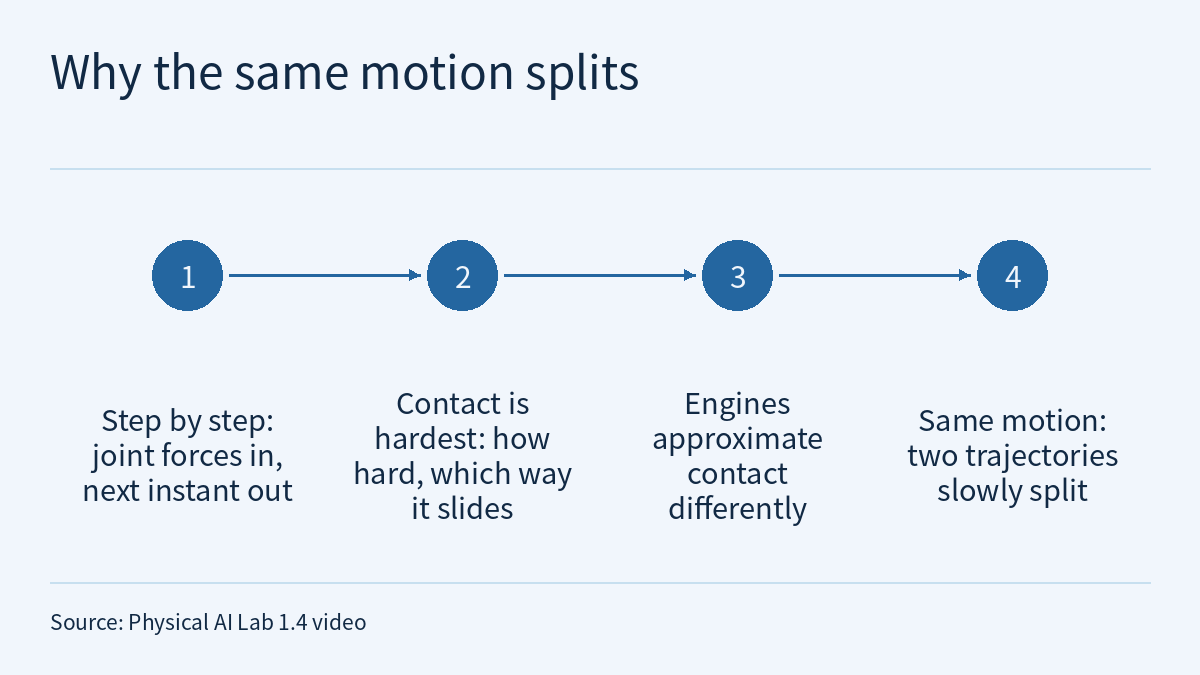
The episode 1.4 video opens with a question: why does the same grasp, run in a different simulator, send the cup flying? It then draws a map of simulators. At its core, a simulator computes in small steps, and the hardest thing to compute is the moment of contact. Engines approximate contact differently, so the same motion fed in produces two trajectories that slowly split. MuJoCo, Isaac, Newton and Genesis each make their own trade-offs, and none is best at every task. The video cites three pieces of evidence: the Isaac Gym technical report’s “2–3 orders of magnitude faster”, NVIDIA’s blog on MuJoCo-Warp making “humanoid simulation more than 70 times faster”, and one paper’s “flat-ground walking in under four minutes”. This page is the episode’s reading and exercises. Rather than repeat the transcript, it first sets out what each of the three speed-up figures is compared against. It then uses a hypothetical grasp to work out by hand what a smaller timestep costs, finds the split point in a hypothetical two-engine replay log, and finally turns “pick the engine by the task” into a checklist you can work through. One rule runs through the whole page: a speed-up factor holds only for its own baseline, task and system, and factors from different sources can be neither multiplied together nor ranked against each other.
The video, transcript and sources for this lesson are at the top of this page; the season plan is in the course outline. The previous lesson, Physical AI Lab 1.3: Sensors — Working Out Pixels, Depth Range and Grip Force for One Cup, ended by asking where a robot can practise, since all those sensors and all that trial and error take too long on real hardware. This lesson picks up there. Physical AI Lab 0.4: Ten Thousand Tries in a Virtual World — Putting the Conditions Back on Three Simulation Numbers has already gone through the experimental conditions behind Isaac Gym’s 2–3 orders of magnitude and Learning to Walk in Minutes. This lesson does not repeat that table or its batch calculation and cites them only where needed. What it adds is the MuJoCo-Warp figure from the Newton blog, and two things that happen inside a simulator: the timestep and contact.
1. Three speed-up figures, and what each is compared against
Here are the original sentences behind the video’s three pieces of evidence, one from each of three documents:
This leads to blazing fast training times for complex robotics tasks on a single GPU with 2-3 orders of magnitude improvements compared to conventional RL training that uses a CPU based simulator and GPU for neural networks.
It enables developers to achieve significant performance gains, with more than a 70x acceleration for humanoid simulations and a 100x speedup for in-hand manipulation tasks.
The parallel approach allows training policies for flat terrain in under four minutes, and in twenty minutes for uneven terrain.
The first comes from the Isaac Gym technical report (arXiv 2108.10470, authors affiliated with NVIDIA), the second from the NVIDIA Developer Blog post Announcing Newton (2025-03-18), and the third from Learning to Walk in Minutes (arXiv 2109.11978, authors from ETH Zurich and NVIDIA). Side by side:
| In the video | About what | Compared with | Task scope | Level |
|---|---|---|---|---|
| 2–3 orders of magnitude faster | Isaac Gym: physics simulation and neural network training both on a single GPU | Conventional RL training with a CPU simulator and GPU neural networks | The complex robotics tasks in the report | R (authors’ report) |
| Humanoid simulation more than 70× faster | MuJoCo-Warp: according to the blog, an open-source robotics simulator from Google DeepMind, accelerated by Warp | The quoted text does not state the baseline, hardware or degree of parallelism | More than 70× for humanoid simulation; 100× for in-hand manipulation, a separate figure | O (vendor blog) |
| Flat ground in under four minutes | Training the ANYmal quadruped with thousands of parallel simulated robots on a single workstation GPU | Not a ratio but a training time; the paper separately says this is multiple orders of magnitude faster than previous work | Under four minutes on flat terrain, twenty minutes on uneven terrain | R (authors’ report) |
Three points to keep in mind when reading this table:
- The three figures differ in unit and baseline. The first compares two training pipelines, the second is one simulator’s speed-up on two kinds of task, and the third is how long one training run took. They cannot be multiplied into a single “total speed-up”, nor used to say that Newton is faster or slower than Isaac.
- The 70× belongs to humanoid simulation only. In the same sentence, in-hand manipulation gets 100×. The quoted text gives no figure for other tasks (legged walking or cloth, for example), and does not say which version of MuJoCo was compared or on what hardware. The video says “NVIDIA says” precisely because this is a vendor blog describing a partner’s tool, not an independent evaluation.
- “Under four minutes” is training time in simulation. The paper says under four minutes, not exactly 4 minutes; the task is flat-ground walking; the condition is thousands of parallel robots on a single workstation GPU. It is not how long the robot took to learn to walk on real ground.
Sign in to keep reading: the rest of this lesson, its self-check questions and the answers.
Limitations
- The figures from Isaac Gym (arXiv 2108.10470, 2021-08-24) and Learning to Walk in Minutes (arXiv 2109.11978, 2021-09-24) are authors’ reports, level R, and both papers have NVIDIA authors. MuJoCo-Warp’s 70× and 100× come from the NVIDIA Developer Blog (2025-03-18), level O, a vendor’s statement; the quoted text does not state the baseline, hardware or test setup. This site has not independently reproduced any of them.
- Newton’s features are described from its announcement blog, which said at the time that development was under way. This lesson does not track later releases and does not judge which features are now available.
- The description of Genesis comes only from the video; this lesson cites no primary source for it. The video’s characterisation of MuJoCo as “computing contact accurately” and Isaac as “realistic images” is also the course’s summary; this lesson found no quantitative data to match.
- The 2.0 s, 0.2 m/s, 10,000 episodes, 1,000 parallel environments and “same cost per step” in section 2, and Engines A and B with all the displacement figures in section 3, are assumptions for the exercises, not the configuration or output of any engine or system. “Checking contact only at step boundaries” is a simplified teaching model and does not describe any real engine’s contact algorithm.
- The right-hand column of section 4 and the checks for the three hypothetical tasks are teaching suggestions, not selection conclusions. This lesson relies on the abstracts and opening sections of the two papers and on the blog text, not on supplementary material; how well the real-robot transfer worked does not appear in these texts.
- The lab page’s four-engine replay is a scripted demonstration, and the video’s visuals are labelled as illustrative; this article has not checked the lab page’s implementation.
Links
- Physical AI Lab: a physical AI course where every number can be checked (course outline)
- Physical AI Lab 1.3: Sensors — Working Out Pixels, Depth Range and Grip Force for One Cup
- Physical AI Lab 1.2: PID and Control Rate — Computing the Three Terms by Hand, Then Turning Rates into Periods
- Physical AI Lab 0.4: Ten Thousand Tries in a Virtual World — Putting the Conditions Back on Three Simulation Numbers
- Isaac Gym: High Performance GPU-Based Physics Simulation For Robot Learning (arXiv 2108.10470)
- Learning to Walk in Minutes Using Massively Parallel Deep Reinforcement Learning (arXiv 2109.11978)
- NVIDIA Developer Blog: Announcing Newton, an Open-Source Physics Engine for Robotics Simulation (2025-03-18)