Lesson video
Narration is AI-generated. Video chapters, transcript and sources
Transcript
Transcript
UNIT-01 asks
Teaching a robot to walk means falling over countless times. Can a real robot afford that? This episode, we open a huge batch of simulated worlds at once, and use reinforcement learning to teach a humanoid robot to walk. The tool is Isaac Lab.
Why practise in simulation
Teaching a real robot to walk is hard. One fall can break it. Someone has to watch over it, and it's painfully slow. Put another way: the real robot is your only treasure. Break it, and it's gone. So you don't dare let it try hard. Real robots are slow, too. For each move, you wait for it to actually finish. No rushing. And you can only teach one at a time. Want it faster? You can't. In simulation, none of that worries you. Fall, start over, and it costs nothing. Not a single part gets hurt. Simulation can also run fast. Time inside can pass many times faster than real time. Even more important is parallelism. There's only one real robot, but a simulator can open a whole field of them at once. In simulation, you can let go. Let it fall hard, and try everything. Of course, simulation isn't reality. We'll come back to that at the end.
Reinforcement learning: learning from rewards
In the last two episodes, robots learned by watching demonstrations. This one is different. This time, there are no demos. So how does it learn? By trial and error. Walk well, get a reward. Fall, lose points. It's a bit like training a puppy. Do it right, get a biscuit. Do it wrong, get nothing. It doesn't know what walking is. All it knows is how to get a higher score. That's both good and bad. It will work hard to find the laziest way to score. The key fits in one line: whatever you reward, that's what it learns. Want it to walk fast and steady? Then give points in that direction. The upside is real. No one has to demonstrate step by step. Give it a goal and a set of rewards, and it tries on its own. That's also the hard part. Set the reward wrong, and it finds a loophole. Say you only reward moving forward. It might dash two steps and take a spectacular tumble. For walking: reward moving forward, punish falling hard, and encourage saving energy. Blend all of that into one score. With every step, it's working out how to score more. The training algorithm is off the shelf. It's called PPO. It tries things and keeps what works. It doesn't need you to hold its hand. You just set the rewards and the rules. So you don't teach it at all. Get the reward right, and it figures out walking by itself!
Thousands of worlds at once
First, the environment. One environment is one robot plus a small patch of ground. It practises there over and over. That patch of ground may be flat, or full of bumps and holes. It forces the robot to build real skill. From flat ground to slopes, from stairs to gravel. The more varied it sees, the steadier it walks. Copy that one environment many, many times. They all start running at once. This is where the GPU shines. It computes many copies at once, filling a screen with a whole crowd. Each environment walks its own way and falls its own way. They don't affect each other, but they all gain experience together. Some are climbing slopes, some are falling, some already walk quite steadily. All on the same screen. After one batch, a flood of experience is fed to it all at once. The official docs say Isaac Lab uses end-to-end GPU training. It can run thousands of environments in parallel. How many is that? In the beginner tutorial, a single balancing-pole task already opens sixty-four environments. For humanoid walking, it's a big crowd practising together too. The gap shows right away. Don't think you need a supercomputer. One consumer graphics card can open a whole crowd. Practising together, experience piles up fast. Thousands of experiences come in at once. It learns very fast. In the same stretch of time, it sees far more ways to fall and to walk than a real robot. With more experience, it works it out: where to put its feet, and how to keep its body steady. So one graphics card can hold a whole crowd of robots learning to walk!
Hands-on and limits
Open this episode's notebook. A heads-up first: it needs an NVIDIA GPU and Ubuntu. The install is not light. Install Isaac Sim, then Isaac Lab. The commands are all in there; just copy them. The install pulls in quite a few dependencies. The first time, you may wait a while. After installing, it's best to run a small built-in example first. Make sure the setup works before the big task. One command starts training. Choose the humanoid walking task, and add headless mode to run faster. Headless mode means it doesn't draw that pretty window. All the compute it saves goes into practice. Start with a small smoke test. Open fewer environments, run a few iterations, and see if it gets going. While training, watch the reward curve. If it keeps going up, it's walking better and better. This curve is its report card. Reading it is more reliable than watching the picture. A wobbly curve is normal. As long as the overall trend is up, you're on track. If the reward isn't rising, the reward is most likely set wrong. Go back, fix it, and train again. After training, play it back. You can watch it find its footing on the terrain, step by step. That moment feels like magic: nobody taught it to step, yet it learned to walk by itself. That's the charm of training in simulation. It saves time, saves money, and it's safe. So don't mind the hassle of installing. Get it running once, and you reuse it from then on. To prepare for the real robot later, we add disturbances on purpose during training. Make the ground a bit slippery. Give it a sudden shove. The more pitfalls it has seen, the calmer it stays when something new happens on the real robot. But simulation is still not reality. Walking steadily in simulation doesn't guarantee it on the real robot. How do we cross that gap? Domain randomization and system identification. Next episode is all about them. Let's recap, three points. One: practise walking in simulation. Falls cost nothing, and many can practise together. Two: reinforcement learning learns from rewards, not demonstrations. Three: a GPU can run thousands of environments at once, so learning is fast. So countless falls are no problem. They all happen in simulation, and one graphics card covers it! But if it walks steadily in simulation and falls on the real robot, then what? See you next time!
Evidence and sources
Practice and self-check
- Interactive quiz5 questions, explained as you answer
- One-page summaryprintable; opens in a new tab
- Download the notebookszip in Chinese, English and Japanese; run in Jupyter or upload to Colab
The quiz is public and explains each answer as you go; answers to the guide's exercises are for signed-in members.
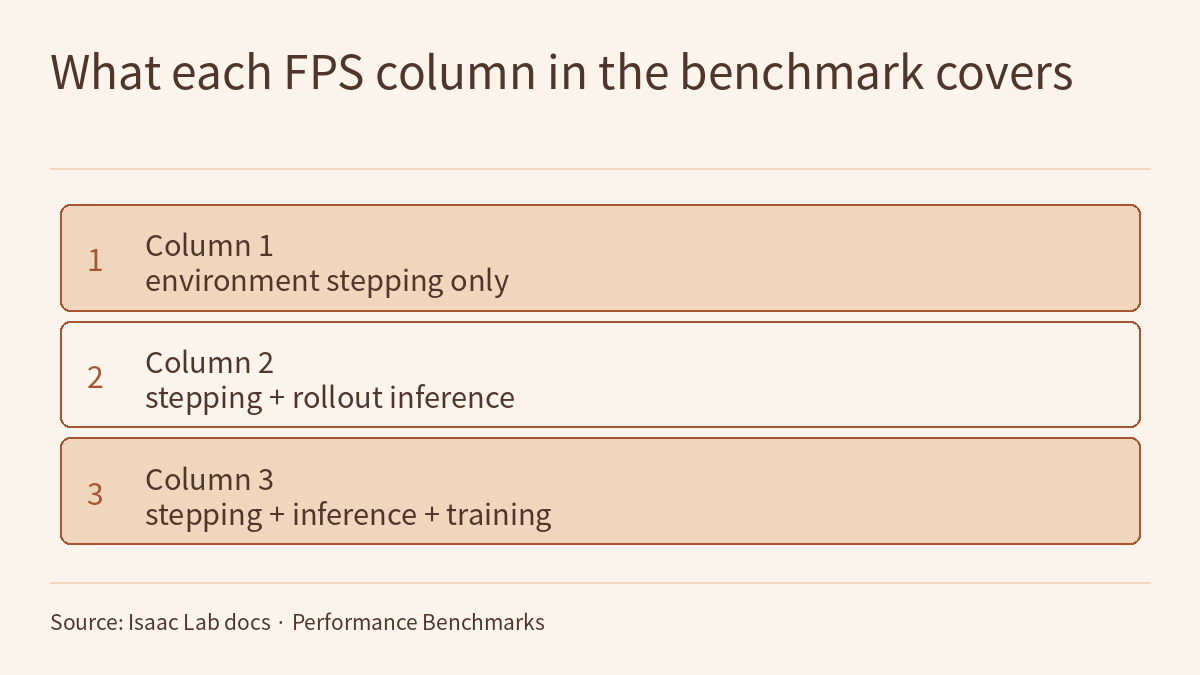
The episode 2.4 video uses reinforcement learning in Isaac Lab to teach a humanoid robot to walk over varied terrain. It makes three points: in simulation a fall costs nothing, and a whole crowd can practise at once; reinforcement learning learns by trial and error from rewards, without demonstrations; and a GPU can run thousands of environments in parallel, but simulation is not reality, so the real robot still has to cross sim2real. The episode’s two number cards come from two pages of the official Isaac Lab documentation: the Performance Benchmarks page says Isaac Lab uses end-to-end GPU training and can train fast in parallel across thousands of environments, and in the getting-started tutorial Training with an RL Agent, the training command for the cart-pole (Cartpole) task uses –num_envs 64. This page is the episode’s reading and exercises. Rather than repeat the transcript, it reads those two pages closely: what each of the benchmark table’s three FPS columns includes, and how numbers from different GPUs and nodes can and cannot be compared; what each flag in the tutorial’s command does, how –num_envs and –max_iterations together set the total number of steps in a run, and where logs, videos and checkpoints end up. One rule runs through the page: a throughput number belongs only to its own row’s task, environment count, hardware and RL library, and the total steps of a run must be worked out from that run’s own flags, not carried over from someone else’s table.
The video, transcript and sources for this lesson are at the top of this page; the season plan is in the course outline. The previous lesson, Physical AI Lab 2.3: Fine-Tuning SmolVLA — Planning Demonstrations for an Instruction, Checking What Each Number Measures, Then Timing the Asynchronous Action Queue, ended by asking: to teach it to walk, it has to practise countless times in a virtual world, so how is that done? This lesson picks up there. Rewards, returns and how a reward gets gamed, along with the terrain curriculum and time-out resets in Learning to Walk in Minutes, were covered in Physical AI Lab 1.7: Reinforcement Learning — Working Out One Episode’s Return to See How a Reward Gets Gamed, Then Reading the Paper’s Terrain Curriculum and Time-out Resets; the experimental conditions behind that paper’s “thousands of robots, under four minutes” were checked one by one in Physical AI Lab 0.4: Ten Thousand Tries in a Virtual World — Putting the Conditions Back on Three Simulation Numbers; keeping steps, batch size and samples apart in a training budget was practised in Physical AI Lab 2.2: Training ACT with LeRobot — Mapping Dataset Metadata to the Model’s Inputs, Then Checking the Training and Evaluation Commands Item by Item. This lesson does not repeat them, and it leaves domain randomization and system identification to the next episode; it covers only the two Isaac Lab documentation pages the video newly uses.
The public quiz’s 5 questions come with full explanations. Signed-in readers can work through three exercises: write smoke-test and full commands for a fictional cart-pole run with the tutorial’s training script, and work out the total steps and logging points from –num_envs and –max_iterations; use the benchmark table’s real numbers to recompute the gaps between the three FPS columns, multi-GPU scaling and the ratio between two single-GPU setups, then judge four claims; and review a fictional plan that uses the benchmark table to estimate the training time and GPU memory for humanoid walking, then rewrite it as a measure-first, scale-later plan. Each comes with a step-by-step solution, common mistakes and a 20-point rubric.
1. What the two pages say
Both pages are official Isaac Lab documentation (the episode’s number cards label them NVIDIA official docs), level O in this course’s grading. This lesson read the unversioned main-branch pages, fetched on 2026-10-19; the pages do not state which Isaac Lab or Isaac Sim version they correspond to, and this lesson does not pin one. The numbers in the documentation are self-reported by the project, and this site has not reproduced them.
The opening sentence of the Performance Benchmarks page is the episode’s “thousands” number card:
Isaac Lab leverages end-to-end GPU training for reinforcement learning workflows, allowing for fast parallel training across thousands of environments.
The same page states the benchmark conditions; the following two sentences are quoted separately:
All benchmarking results were performed with the RL Games library with –headless flag on Ubuntu 22.04.
Isaac-Velocity-Rough-G1-v0 environment benchmarks were performed with the RSL RL library.
In the Training with an RL Agent tutorial, the episode’s “64” number card corresponds to the command for the first way of training (headless execution):
./isaaclab.sh -p scripts/reinforcement_learning/sb3/train.py --task Isaac-Cartpole-v0 --num_envs 64 --headlessThe tutorial’s explanation of headless execution:
Typically, it speeds up the training process since only physics simulation step is performed.
The table below matches the video’s statements to the two pages; it is this lesson’s summary, not sentences from the originals:
| In the video | Source | Conditions the documentation states | What the documentation does not say |
|---|---|---|---|
| Thousands of environments can run in parallel | Performance Benchmarks | End-to-end GPU training; the benchmark table’s environment counts are 1024, 4096 or 8192 | “Thousands” is neither a ceiling nor a guarantee; the table has no other environment counts |
| Add headless mode to run faster | Training with an RL Agent | Headless means no rendering during training, which is typically faster because only the physics simulation step is performed | How much faster |
| The beginner cart-pole opens 64 environments | Training with an RL Agent | A Stable-Baselines3 PPO agent trains Isaac-Cartpole-v0; the example command sets –num_envs 64 | That 64 is a recommended value |
| Humanoid walking is also a big crowd practising together | Performance Benchmarks | The table’s humanoid task Isaac-Velocity-Rough-G1-v0 runs 4096 environments, measured with RSL RL; RAM 6.5 GB, VRAM 6.1 GB | The task’s rewards or terrain, or how long training takes until it walks steadily |
| One consumer graphics card can open a whole crowd | Performance Benchmarks | One of the single-GPU setups is an RTX 4090, with an AMD Ryzen 9 7950X CPU | The page does not classify GPUs, nor say how many environments a smaller card can run |
Three things to note when reading this table:
- The two pages’ cart-pole tasks have different names. The benchmark table lists Isaac-Cartpole-Direct-v0 (plus Isaac-Cartpole-RGB-Camera-Direct-v0 with camera observations), while the tutorial and the benchmark script examples use Isaac-Cartpole-v0. The table’s memory and FPS cannot be applied directly to the tutorial’s command.
- The RL libraries differ. The benchmark table uses RL Games for every row except G1, G1 uses RSL RL, and the tutorial uses Stable-Baselines3. The page gives no comparison of the same environment under different RL libraries, so the numbers in the “with training” column belong only to the library in the table.
- A “crowd” is one dimension in the code. The tutorial says:
The input and outputs of the environment are not numpy arrays, but rather based on torch tensors with the first dimension being the number of environment instances.
In other words, with –num_envs 64 the observations, actions and rewards are tensors whose first dimension is 64. Each RL library expects a different interface (Stable-Baselines3, for example, expects the VecEnv interface, a list of numpy arrays), so Isaac Lab converts the environment with wrappers in the isaaclab_rl module. The tutorial cautions that the learning framework’s wrapper must be applied last, after all other wrappers, because it changes how the environment’s APIs are interpreted and may no longer be compatible with gymnasium.Env.
Sign in to keep reading: the rest of this lesson, its self-check questions and the answers.
Limitations
- Performance Benchmarks and Training with an RL Agent are official Isaac Lab documentation, level O; this lesson read the unversioned main-branch pages, fetched on 2026-10-19, without pinning an Isaac Lab or Isaac Sim version. Commands, flags and defaults may change between versions. The benchmark table’s numbers are self-reported by the project, and this site has not reproduced them.
- The page does not define whether FPS counts steps summed across all environments, does not say whether the environment count with several GPUs is per GPU or in total, and does not say which GPU the memory table was measured on. The following are this lesson’s readings or inferences, not statements in the originals: the three stages’ times add up; FPS counts steps summed across all environments; the number of env.step calls equals the total steps divided by the environment count; –log_interval is read from its help text as logging once every n timesteps; with -1, the seed actually used is written into params/agent.yaml.
- Before it reads n_timesteps, train.py calls agent_cfg = process_sb3_cfg(agent_cfg, env_cfg.scene.num_envs), and the page does not show what that function changes; treating the total-steps formula’s result as the steps actually trained, and Task 1’s totals of 20,480 and 4,915,200, rest on that reading.
- In the extracted page text, the benchmark script example had spaces around the equals sign after –task; this lesson removed them. Check against the original page before copying.
- n_steps = 32, 16 and 24, teams P and R, their machines, the 8 GB of VRAM, the budgets of 50 million and 20 million steps, the four statements in the plan, the measured FPS of 40,000 and 52,000 and the 90 s startup time are fictional and for practice only; 10,240, 20,480, 4,915,200, 609.8 s and the like hold only under these assumptions. The multiples and shares in Task 2 are this lesson’s divisions of the table’s real numbers; the page itself does not give them.
- This page did not run the episode’s notebook or any training, playback or benchmark command. The video’s reward design, terrain, disturbances and its pictures of the robot “learning to walk by itself” have no corresponding numbers in the two pages this lesson read, and this lesson does not check them. Walking steadily in simulation does not mean walking steadily on the real robot; calculations on paper and simulation results are not hardware safety validation.
Links
- Physical AI Lab: a physical AI course where every number can be checked (course outline)
- Physical AI Lab 2.3: Fine-Tuning SmolVLA — Planning Demonstrations for an Instruction, Checking What Each Number Measures, Then Timing the Asynchronous Action Queue
- Physical AI Lab 1.7: Reinforcement Learning — Working Out One Episode’s Return to See How a Reward Gets Gamed, Then Reading the Paper’s Terrain Curriculum and Time-out Resets
- Physical AI Lab 0.4: Ten Thousand Tries in a Virtual World — Putting the Conditions Back on Three Simulation Numbers
- Isaac Lab documentation: Performance Benchmarks
- Isaac Lab documentation: Training with an RL Agent