
Lesson video
Narration is AI-generated. Video chapters, transcript and sources
Transcript
Transcript
UNIT-01 asks
It trained just fine on the computer. So why does the robot fall apart the moment it moves to the real world? This episode is about going from simulation to reality. Why is there a gap? And two fixes: domain randomization, and system identification.
The reality gap
Same scene as episode two point one: a table and a cup. This time, we give the cup a horizontal push. First, a push in simulation. The cup slides away, and friction slowly brings it to a stop. Where it stops depends on three things: how heavy the cup is, how slippery the table is, and how late the action comes. Same push, different friction, and it lands somewhere else. That is exactly the trouble. In simulation, you set all three numbers. On a real robot, you can't pin them down. Simulation and the real robot don't match. That's called the reality gap. Friction, mass, latency: any of them can be off. Then there's sensor noise, and friction nobody modelled. On a real robot, the surprises never end. Here's a real-robot example. Same command, but the motor heats up, and the force it puts out changes. Then there's gear backlash, and cables pulling. By default, a simulation has none of these details. In simulation, friction is a single clean number. On a real robot, it varies from spot to spot. A classic fix comes from a paper on domain randomization. The paper reports training only on random textures in simulation. In the real world, it located objects to within one point five centimetres. The idea is clever. Don't chase a more realistic simulation. Make it varied enough. With enough variation, the real world may look like one more variant it has seen. In the paper's setup, training used only simulated images. So the point isn't more realism. It's more variety!
Domain randomization
How does domain randomization work? Every training run, the simulation's parameters are swapped for a random new set. Note: the randomness isn't just adding a little noise. Every run, you swap in a whole new world. Domain randomization literally means randomizing the domain. And the domain is simply the range a parameter can take. Friction first. MuJoCo's default sliding friction coefficient is one. Real surfaces vary wildly, so we randomize it. Next, latency. In this lesson, we model it in whole time steps. By default, one step is two milliseconds. Latency: hold a few steps, then act. Randomizing latency means holding a different number of steps each run. Sometimes a bit faster, sometimes a bit slower. Then there's mass. A light cup flies off at one push; a heavy cup takes effort. We randomize that too. In the simulator, that's easy to change. Just edit the friction and mass in the model, and reset. Latency is easy too. Hold the control signal back a moment before sending it in, and you've simulated a late arrival. Hands-on. In the Notebook, we do lots of runs, each with different parameters. See where the results scatter. Plot each run's landing spot as a distribution. Same action, but the results spread across a whole range. That whole range is the point. Only when a policy works across all of it do you dare move it to the real robot. Same for evaluation. Don't test in just one environment; test across the whole range. Latency alone is a handful. The real robot's feedback often arrives half a beat later than in simulation. Setting the range is a craft. Too narrow, and it's useless; too wide, and the policy gets dumb. Another paper randomizes the dynamics. It takes a policy trained in simulation straight onto the real robot. The paper reports: with no training on the real robot, the policy still did the object-pushing task it tested. That's where domain randomization gets its confidence. Treat the unknowns as practice problems. That's so clever!
System identification
A different approach. Rather than spreading the range wide, just measure the real parameters directly. This is system identification: using real data to work backward to the model's parameters. Just one goal: make simulation more like the real robot. It's straightforward. Have the real robot do a motion, and record its trajectory. Log position, velocity and time in full. Why not measure a few times and average? Because what you want is the parameter, not the average landing spot. Then tune the parameters in simulation, until the simulated trajectory lines up with the real one. Let's demo identifying friction. First, pretend one friction value is true, and use it to generate a trajectory. Next, define a loss. How far a candidate friction's trajectory is from the real one: that's the loss. Sweep through the candidates. The one with the lowest loss is the identified friction. The loss curve is a bowl. The point at the bottom matches the right friction. The result is lovely. The fitted friction, and the true value we set at the start: almost identical. The trajectories line up, which means the simulation's dynamics are now close to the real robot's. This step is the key to identification. The identified friction can be fed back into the simulation. The next round of training will be more reliable. Too clumsy to sweep one by one? Hand it to an optimizer, and let it find the lowest loss itself. But identification has preconditions. The model's structure has to be right, there has to be enough data, and the parameters must be identifiable. Some are easy to identify, like friction. Others are hard, like tiny quantities buried in noise. In practice, the two often go together. Identify first to narrow the range, then randomize to cover the rest. You can even identify on the fly: collect data on the real robot, while updating the simulation. This online approach is also called adaptive simulation. The simulation follows the real robot, calibrating bit by bit. In the end, the goal fits in one sentence: what's learned in simulation should work on the real robot too. One spreads out, one narrows in. They're a pair of partners! Let's recap, three points. One, simulation and reality have a gap. Two, domain randomization turns uncertainty into practice problems. Three, system identification measures the real parameters. So that's how you patch the gap between simulation and reality! The parameters line up, and the model goes onto the robot. Then how do latency and compute hold it back? See you next time!
Evidence and sources
Practice and self-check
- Interactive quiz5 questions, explained as you answer
- One-page summaryprintable; opens in a new tab
- Download the notebookszip in Chinese, English and Japanese; run in Jupyter or upload to Colab
The quiz is public and explains each answer as you go; answers to the guide's exercises are for signed-in members.
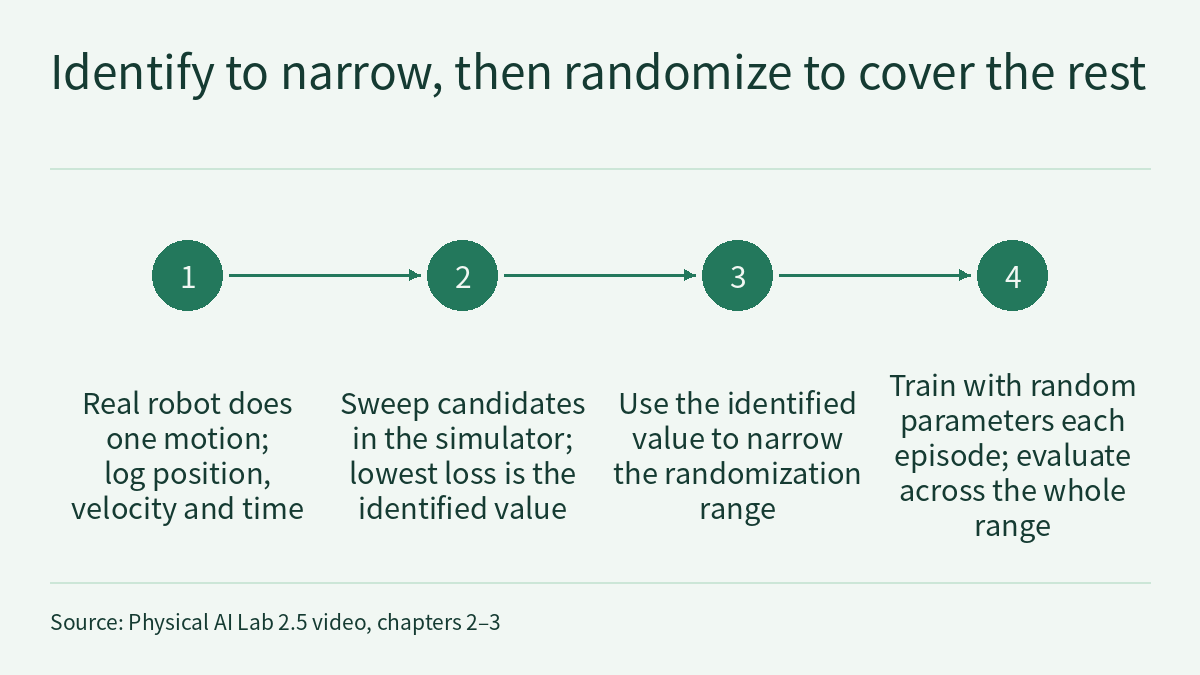
The episode 2.5 video is about going from simulation to the real robot (sim2real). It makes three points: there is a “reality gap” between simulation and the real robot, because friction, mass, latency and sensor noise may all fail to match; domain randomization swaps the simulation’s parameters for a random new set every training episode, aiming for variety rather than realism, so that the policy holds up across a whole range of cases; and system identification works the other way, using real-robot data to work back to the parameters. The video demonstrates fitting friction from one trajectory, and in practice the two are often combined: identify first to narrow the range, then randomize to cover the remaining error. The video’s four number cards come from three public sources (two attribute descriptions in the MuJoCo XML Reference account for one card each): the domain randomization paper by Tobin et al. (arXiv 1703.06907) reports that, trained only on simulated data with random textures, real-world object localization reached 1.5 cm; the MuJoCo XML Reference (v3.14.0) gives a default sliding friction coefficient of 1 and a default timestep of 0.002 seconds; and the dynamics randomization paper by Peng et al. (arXiv 1710.06537) reports that, with no training on the real robot, the policy still did the robotic-arm object-pushing task it tested. This page is the episode’s reading and exercises. Rather than repeat the transcript, it does three things the video only touches on: it puts each paper’s number back into its own task and setup, showing that one paper randomizes rendering and the other randomizes dynamics; it reads those two MuJoCo passages to work out which model quantity, in which unit, “randomizing friction, mass and latency” changes in the cup scene; and it uses a hypothetical cup to work out a loss curve by hand, showing why the stopping point alone cannot separate friction from mass while a time-stamped velocity record can. One rule runs through the page: a randomization range or an identified value must state which quantity in the model it changes, in which unit, and from which data; a number in a paper belongs only to that paper’s task.
The video, transcript and sources for this lesson are at the top of this page; the season plan is in the course outline. The previous lesson, Physical AI Lab 2.4: Parallel Walking Practice in Isaac Lab — Reading the Benchmark Table’s Three FPS Columns, Then Working Out a Run’s Total Steps from the Training Command, ended by asking: it walks steadily in simulation, but what if it falls on the real robot? This lesson picks up there. The table-and-cup scene comes from Physical AI Lab 2.1: Building a Grasping Scene in MuJoCo — Working Out the Mass, Units, Timestep and Collision Rules the XML Leaves Unwritten, which already worked out the default mass, density and timestep that the MJCF leaves unwritten; how to pair evaluations and record failure labels and random seeds was practised in Physical AI Lab 1.8: Evaluation — Splitting a “Net Gain of 2” into a Paired Table, Then Checking the Failure Labels and Random Seeds. This lesson does not repeat them. Latency, quantization and control rate on the real robot are the next episode’s topic (2.6); this lesson treats latency only as a parameter in simulation.
The public quiz’s 5 questions come with full explanations. Signed-in readers can work through three exercises: write a domain randomization spec for a fictional cup, mapping each parameter to a specific quantity in the MuJoCo model, converting latency from milliseconds to steps and checking what a timestep change does to the range; work out a loss sweep by hand from a fictional cup-push trajectory and judge, one by one, whether friction, mass and latency can be identified from that data; and review a fictional sim2real plan that cites the two papers, putting each statement back into the original conditions, then rewrite its ranges and evaluation to identify first and randomize next. Each comes with a step-by-step solution, common mistakes and a 20-point rubric.
1. The two papers: what each randomized and what each reports
Both are arXiv preprints, level R in this course’s scheme; the numbers below are author-reported, and this site has not reproduced them. This lesson read the abstract and the first sections of each paper’s HTML version: Tobin et al. up to the start of the method section’s model architecture, and Peng et al. up to the definition of state and action.
Tobin et al.: domain randomization of rendering. The video’s “1.5 centimetres” number card corresponds to this sentence in the abstract:
We find that it is possible to train a real-world object detector that is accurate to 1.5 cm and robust to distractors and partial occlusions using only data from a simulator with non-realistic random textures.
The sentence is about an object detector: its input is a single frame from one monocular camera, and its output is the Cartesian coordinates of each object of interest. The paper treats object localization as a stepping stone to general manipulation skills, and uses the detector to demonstrate grasping in a cluttered environment. Because the camera is uncalibrated and only a single image is used, the paper fixes the table height in simulation, which effectively makes it a 2D position estimation task. The method section lists seven aspects randomized for every training sample:
- the number and shape of distractor objects on the table (0 to 10 per scene);
- the position and texture of all objects on the table;
- the textures of the table, floor, skybox and robot;
- the position, orientation and field of view of the camera;
- the number of lights in the scene;
- the position, orientation and specular characteristics of the lights;
- the type and amount of random noise added to images.
Textures are chosen at random from three kinds: a random RGB value, a gradient between two random RGB values, and a checker pattern of two random RGB values. The camera is placed at random within a 10 × 5 × 10 cm box around a manually placed starting point; its viewing angle, aimed at a fixed point on the table, is offset by up to 0.1 radians in each direction, and its field of view is scaled by up to 5%. Images are rendered with MuJoCo’s built-in renderer, which the paper says is not intended to be photo-realistic. So the video’s “training only on random textures” is the abstract’s wording; the method randomizes far more than textures. The paper’s introduction also says that even with strong system identification, the real world has effects that current simulators do not capture, such as nonrigidity, gear backlash, wear-and-tear and fluid dynamics; this paper deals only with one part of the reality gap, low-fidelity camera images. The randomized aspects listed in the method section include no friction, mass or latency, and 1.5 cm is the localization accuracy measured on its geometric objects, its table and its camera.
Peng et al.: dynamics randomization of the physics. The video’s “no real-robot training” number card corresponds to these two sentences in the abstract:
This adaptivity enables the policies to generalize to the dynamics of the real world without any training on the physical system. Our approach is demonstrated on an object pushing task using a robotic arm.
The paper’s task is to use a 7-DOF Fetch Robotics arm to push a puck on a table to a target position chosen at random each episode; the reward is 0 when the puck is within a given distance of the target and −1 otherwise, and Hindsight Experience Replay is used to cope with this sparse reward. The policy is a recurrent neural network, and the simulated model uses MuJoCo. The training objective changes from maximizing return under one dynamics model to maximizing expected return across a distribution of dynamics parameters μ. The abstract says that despite being trained only in simulation, the policies maintain a similar level of performance when deployed on a real robot, and are robust to significant calibration error; the body adds that memory-based policies cope better with variability during training than memoryless feedforward policies, and generalize better to the real world’s dynamics. These are the authors’ statements. Note that “no training on the real robot” does not mean “no testing on the real robot”: the paper’s conclusions come precisely from deployment on the real robot. The text this lesson read ends where the method section defines state and action; it does not include the list of randomized parameters, their ranges, success rates or numbers of trials, so this lesson does not list them on the paper’s behalf.
| Paper | What was randomized | What was trained | Reported result (R, author-reported) | What it does not support |
|---|---|---|---|---|
| Tobin et al., arXiv 1703.06907 | Rendering: textures, camera, lights, distractors, image noise | A detector that estimates object positions from a single image | Real-world localization accuracy of about 1.5 cm, robust to distractors and partial occlusions | Any conclusion about friction, mass or latency; the error of where a pushed cup lands |
| Peng et al., arXiv 1710.06537 | The simulator’s dynamics (the text this lesson read does not list the parameters) | A recurrent neural network policy for pushing a puck | With no training on the real robot, it still did the pushing task when deployed there | Skipping real-robot tests before deployment; parameters, ranges and success rates beyond the text this lesson read |
Sign in to keep reading: the rest of this lesson, its self-check questions and the answers.
Limitations
- Tobin et al. and Peng et al. are both arXiv preprints, level R; the numbers on this page are author-reported, and this site has not reproduced them. This lesson read the abstract and the first sections of each paper’s HTML version (Tobin et al. up to the start of the method section’s model architecture, Peng et al. up to the definition of state and action); it did not read Peng et al.’s list of randomized parameters, ranges, success rates or numbers of trials, nor Tobin et al.’s ablation results.
- The MuJoCo documentation is pinned to v3.14.0. The rule by which a contact pair’s friction is combined via solmix and priority is in the Contact parameters section, which this lesson did not read, and the lesson does not state the default combination; defaults and attributes may differ in other versions.
- The following are this lesson’s modelling choices or inferences, not statements in the originals: modelling latency in whole time steps (the video also notes this is the lesson’s approach); the simplified model in section 3 and the exercises (instantaneous impulse, constant sliding friction, g = 10 m/s²) and the Δv loss; “this trajectory can identify only J ÷ m” and “the information about latency is not in the data”, both inferences under that model; the margins on the randomization ranges and the levels in the evaluation plans.
- Cup B, cup C, team Q, and all values of friction, mass, impulse, speed, distance, latency, timestep choices, episode counts and success rates in section 3 and the exercises are fictional; 0.41, 0.30, 0.246 kg and the like hold only under these assumptions.
- The latency range of 0–40 steps labelled on screen in the video is noted as matching the Notebook; this lesson did not run the Notebook or check its timestep, so the conversion to 0–80 ms holds only at the default timestep. The video says the real robot’s feedback “often” arrives half a beat late; the material this lesson read has no corresponding number.
- Calculations on paper and simulation results are not hardware safety validation; trials on a real robot need their own safety preparation.
Links
- Physical AI Lab: a physical AI course where every number can be checked (course outline)
- Physical AI Lab 2.4: Parallel Walking Practice in Isaac Lab — Reading the Benchmark Table’s Three FPS Columns, Then Working Out a Run’s Total Steps from the Training Command
- Physical AI Lab 2.1: Building a Grasping Scene in MuJoCo — Working Out the Mass, Units, Timestep and Collision Rules the XML Leaves Unwritten
- Physical AI Lab 1.8: Evaluation — Splitting a “Net Gain of 2” into a Paired Table, Then Checking the Failure Labels and Random Seeds
- Tobin et al.: Domain Randomization for Transferring Deep Neural Networks from Simulation to the Real World (arXiv 1703.06907)
- Peng et al.: Sim-to-Real Transfer of Robotic Control with Dynamics Randomization (arXiv 1710.06537)
- MuJoCo documentation, XML Reference (v3.14.0): geom friction
- MuJoCo documentation, XML Reference (v3.14.0): option timestep