
dsh-skills-anywhere 0.9 adds a bounded manifest of a skill’s whole directory (a bundle manifest) alongside the existing single-file check. The documentation states the reason at the outset: an unchanged SKILL.md does not mean the scripts and reference files next to it are unchanged. Based on docs/BUNDLES.md and docs/MCP-COMPATIBILITY.md pinned at commit c011051, this article covers how to use the manifest in a skill review: the commands that generate and compare it, the three exit codes, how to require the same directory identity when loading through MCP, the manifest format and its limits, and what a matching digest does not establish.
This site’s Skills Anywhere: one catalog for the SKILL.md files spread across AI tools, loaded on demand through dsh or MCP gives an overview of the project, including its file checks and hash-pinned loading. Everything described below comes from the project’s documentation ([O], the project’s own account). The test results in the documentation are reported by the project; this site did not run these commands or tests.
Why checking SKILL.md alone is not enough
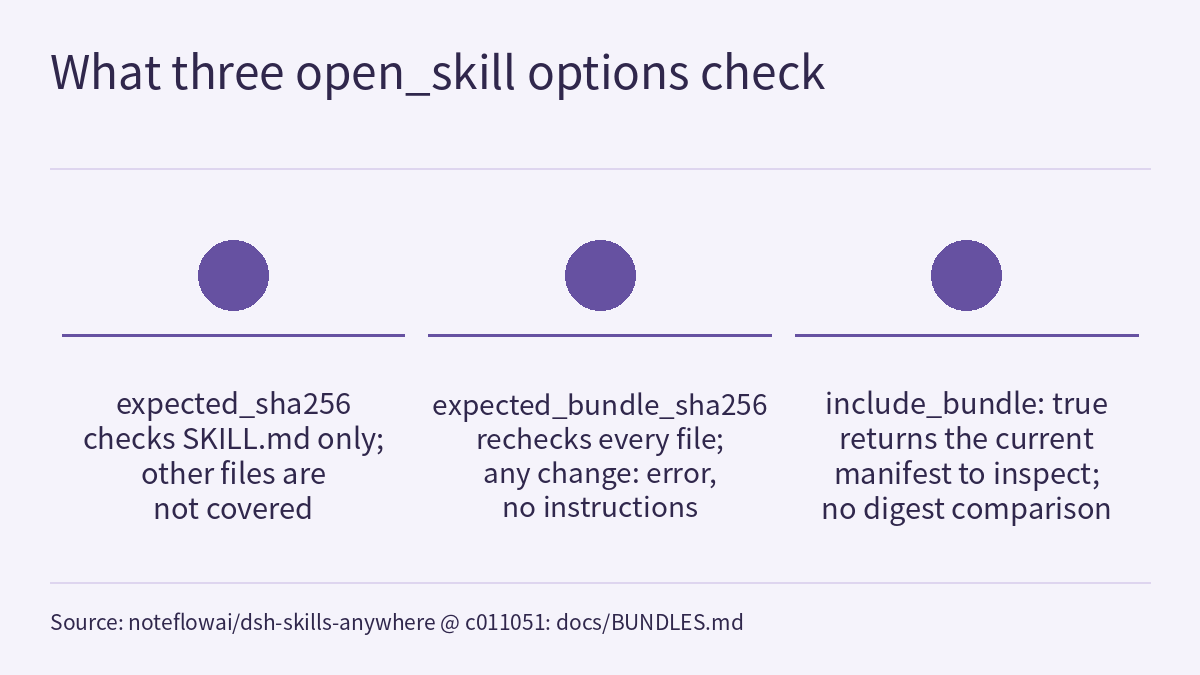
The Agent Skills specification cited by the documentation (checked on 2026-09-14, according to the documentation) describes a skill as SKILL.md plus optional scripts, references and assets. The existing expected_sha256 argument of the MCP tool open_skill checks SKILL.md only. MCP-COMPATIBILITY.md states that this hash does not cover referenced scripts or other files, and does not establish author identity. So the following can happen: the SKILL.md you read during review has not changed by a single character, yet the script it tells the agent to run has been replaced.
The directory manifest records every regular file under the chosen directory: its relative path, byte length and SHA-256, including hidden and binary files. The documentation also says this is a project-specific content-identity format, not an extension claimed to be part of the Agent Skills specification.
Generating and comparing manifests locally and in CI
The documentation gives these two commands, with its original comments:
# Keep both the review manifest and output logs outside the skill directory.
npx -y dsh-skills-anywhere@0.9.0 bundle /path/to/skill --json > reviewed-bundle.json
# Review the actual files, then retain the manifest in your review record.
npx -y dsh-skills-anywhere@0.9.0 bundle /path/to/skill \
  --against reviewed-bundle.json --json
The first comment says to keep both the review manifest and output logs outside the skill directory; the second, to review the actual files and then retain the manifest in your review record. The first command generates a manifest of the directory as reviewed; the second uses --against to compare the current directory with the saved manifest. The commands name the package version @0.9.0, so the tool version that npx runs is pinned by the command itself. The section is titled “Local review and CI”, but the documentation does not provide a CI configuration file.
| Command | Exit code | Condition stated in the documentation |
|---|---|---|
| Generate a manifest | 0 | Generation succeeded |
Compare (--against) | 0 | File paths and contents match |
Compare (--against) | 1 | Differences |
Compare (--against) | 2 | Invalid inputs, unstable reads or unsupported directory entries |
The documentation does not state an exit code for a failed manifest generation, and this article does not guess one. The comparison JSON includes added, removed, changed, both digests and the current manifest. A rename appears as one removed path and one added path. Human-readable output escapes input-derived paths. Neither command discovers other skill roots, runs Git, synchronizes repositories or executes skill code.
Where to keep the manifest
A saved manifest must be outside the skill directory, or it becomes its own input. Shell redirection can create a file before the command starts, so always redirect to a separate review directory. The commands above write reviewed-bundle.json to the current directory, which means the current directory must not be inside the skill directory when you run them. Nothing is silently ignored: pass the skill’s own directory, not an entire application checkout with caches or Git metadata.
A hypothetical example
The following is a scenario this site made up for illustration, not a run result. Suppose that at review time the directory contained only SKILL.md and scripts/review.py, and that afterwards only scripts/review.py was edited. Under the documented contract, the second command ends with exit code 1 and scripts/review.py appears in changed. If the edit was renaming it to scripts/check.py, the result is scripts/review.py under removed and scripts/check.py under added. If a symlink pointing elsewhere was added to the directory, the documentation lists it as a rejected entry, so according to the table above the result should be exit code 2, not 1.
Comparing received manifests in the browser
The Hugging Face demo page includes an example written by the author in which only scripts/review.py changes; both manifests in the example are produced by the real filesystem reader during the site build. You can download either manifest and restore the files that match it, or open two JSON manifests of your own to inspect the differences. Before comparing, the browser recomputes each manifest’s digest with the same canonicalization the CLI uses. Input stays in page memory and is not uploaded, stored or added to share links; invalid input clears the affected result; resetting to the example cancels pending file reads. The page compares recorded manifests. It cannot check your filesystem or connect to your local MCP server.
Requiring the same directory identity when loading through MCP
Once the review passes, call open_skill with the digest from the manifest:
{
  "name": "your-discovered-skill-name",
  "expected_bundle_sha256": "<manifest.sha256 from your reviewed bundle>"
}open_skillrecomputes the directory manifest before returning instructions. If any file has been added, removed or modified, the digest does not match and the call returns an error without the instruction body. The returnedbundlefield is the manifest that was checked.- Without a previously saved digest,
include_bundle: truelets you inspect the current manifest. Passingexpected_bundle_sha256implies that option. expected_sha256still checksSKILL.mdalone, and both digest arguments can be used together. In bundle mode, the returned instructions and their file hash come from the same bytes used for the directory manifest.- Even when the digest matches, the author’s current opt-out settings still apply.
- Directory hashing is opt-in, and only on the standalone MCP server’s
open_skilltool; default tool and resource loads, and the dsh provider, behave as before.
MCP-COMPATIBILITY.md reports the related 0.9 tests: the same four SDK configurations (SDK 1.30.0, plus SDK 2.0.0 with legacy, auto and pinned 2026-07-28 negotiation) each load with expected_bundle_sha256, then modify only a resource file while leaving SKILL.md unchanged, and confirm the load is rejected. The installed npm archive is also checked this way with both SDK generations, with CLI operations running under an empty PATH. These are the project’s own test records.
Manifest format and limits
The skills-anywhere-bundle-1 format has exactly four fields: schema, sha256, total_bytes and files; each file entry has exactly path, bytes and sha256. Rows are sorted by slash-separated relative path in ascending JavaScript string order; paths are unique, and no path can also be the parent of another file. No Unicode normalization or locale-dependent sorting is applied. The directory digest is the SHA-256 of this UTF-8 JSON tuple, without whitespace:
["skills-anywhere-bundle-1",[["relative/path",byte_length,"file_sha256"],...]]The absolute directory, package version, timestamps and JSON formatting are not part of this identity, so moving identical files to another directory keeps the same digest. SKILL.md must exist and be valid UTF-8, but manifest generation does not validate frontmatter; use the check command for parser results. Other files may be binary.
| Bound | Limit |
|---|---|
| Files | 512 |
| Total directory entries | 1,024 |
| Path levels | 12 |
SKILL.md | 128 KiB |
| Any other single file | 16 MiB |
| Directory total | 32 MiB |
| A single received manifest | 1 MiB |
| A single relative path | 1,024 UTF-8 bytes |
Paths containing control characters, backslashes, colons, traversal segments or Unicode replacement characters are rejected. If the installation root is itself a symlink, it is resolved once; symlinks beneath it and special files such as pipes are rejected. File reads, directory enumeration and the final metadata checks detect changes made during inspection.
Limitations
- A matching digest only identifies the recorded file paths and content bytes. It does not authenticate an author, determine whether code is safe, or prove that a model followed the instructions.
- Empty directories, permissions, ownership, files outside the directory, installed packages, interpreter versions, remote URLs and dynamically loaded content are outside the digest.
- It neither infers nor authenticates a Git revision. Where repository provenance matters, keep a separately reviewed source revision.
- Inspection does not freeze the directory, so later resource reads or execution may see different content. The documentation recommends a stable, controlled checkout and enforcing your own execution policy at the point of use. The feature detects directory changes at load or inspection time; it is not a sandbox, nor a benchmark of defensive capability.
- Default tool and resource loads do not hash the directory; without the explicit argument there is no such protection.
- The MCP compatibility tests check protocol interoperability at the SDK level; they do not certify every release of specific applications such as Claude Code, Cursor or Codex. The documentation’s 0.8 section states that the package exposes stdio and that 0.8 adds no HTTP transport, authorization or remote hosting.
- This article is based on the documentation at commit
c011051, with commands pinned to 0.9.0; later versions may differ in arguments, fields or exit codes.
Links
- Directory manifest contract: docs/BUNDLES.md (commit c011051)
- MCP compatibility matrix and the 0.9 directory tests: docs/MCP-COMPATIBILITY.md (commit c011051)
- Comparing manifests in the browser: Hugging Face Space: dsh-skills-anywhere
- Skill directory structure: Agent Skills specification
- Related article on this site: Skills Anywhere: one catalog for the SKILL.md files spread across AI tools, loaded on demand through dsh or MCP