
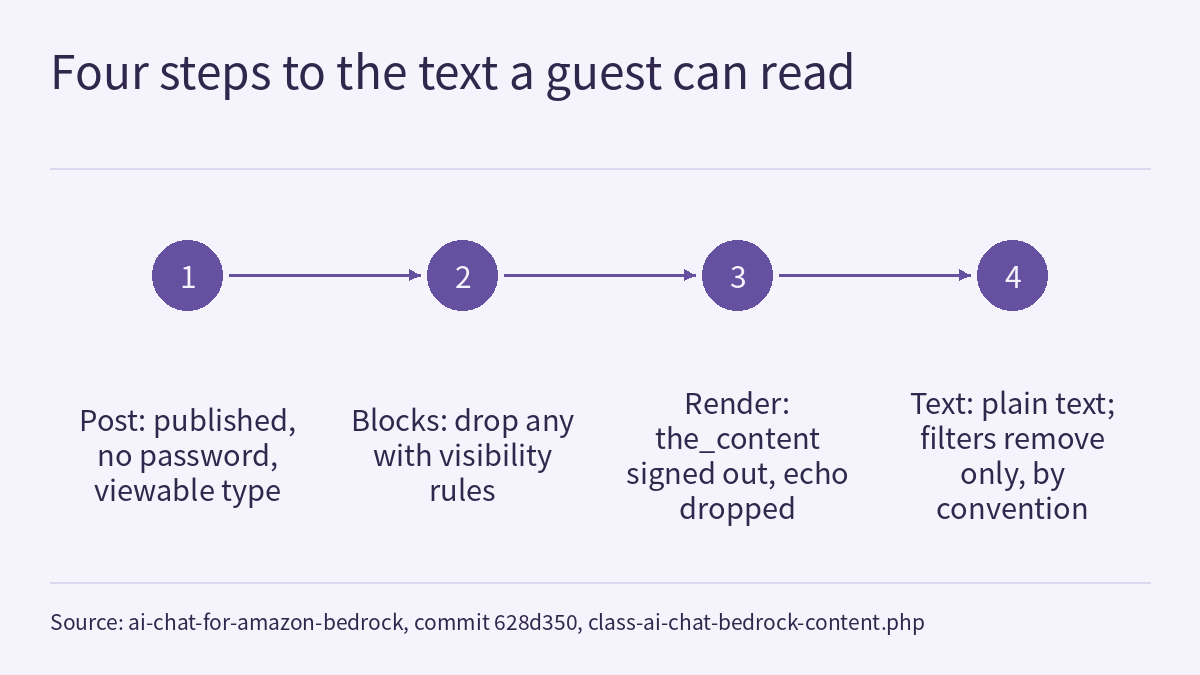
Once a WordPress site adds an AI chat, where the text for the model and the vector index comes from decides whether members-only content leaks into answers given to signed-out visitors. In AI Chat for Amazon Bedrock at pinned commit 628d350, includes/class-ai-chat-bedrock-content.php funnels this into a single exit: check whether the whole post is public, remove blocks that carry visibility rules, render the content as a signed-out visitor, and use only what that rendering produces. Based on that source and the synthetic-data tests in the repository, this article explains what each step covers, why noindex pages are handled separately, and what a site still has to add itself.
For the plugin as a whole, see AI Agents & Chat for Amazon Bedrock: the WordPress chat and MCP plugin this site runs on; for another boundary in the same plugin, around order data, see “Package”, “returns” or “shipped” alone is not enough: how a WooCommerce chat assistant decides a message is about an order. The conclusions below come from reading the source and test files ([O], the project’s own implementation and assertions). This article did not run the tests and did not verify anything on a live site.
Why stripping tags is not enough
The file’s header comment explains the cause. Membership and visibility plugins (the comment lists Block Visibility, Paid Memberships Pro, MemberPress, Restrict Content and others) hide sections while the page renders, so the post_content stored in the database still holds text a guest never sees. Stripping tags from that stored markup and indexing it put members-only paragraphs into the embeddings and into the reference material a guest’s question was answered from. The comment states that everything the plugin hands to a model or a vector index comes from this class: the post is passed through the_content with nobody signed in, and only what that produces is used.
The public entry point is public_text(): it returns the plain text a signed-out visitor sees, title first, with paragraph breaks kept so the text can later be split into passages.
The whole post: public, and usable for answers
is_public() requires the post status to be publish, no access password, and a post type that is publicly viewable (is_post_type_viewable()). For a post that fails, public_text() returns an empty string. A site can mark a published post as not public through the filter ai_chat_bedrock_is_public_post; the comment’s example is a members-only post type that a membership plugin guards per request. Content meant entirely for a restricted audience should be excluded at this level.
The chat and agents have one more check, is_answerable(): even when a post is public, a page that an SEO plugin marks noindex is not used for answers by default. The comment’s reasoning is that a page a site keeps out of search engines is usually kept out for a reason, such as a thank-you page with the download a form gives away, a campaign landing page, or a page for one customer; the chat is a search of the site, so it leaves those out too unless the setting include_noindex is on. The code reads the per-post and post-type default settings of Yoast SEO, Rank Math and SEOPress, and All in One SEO’s per-post setting; “Discourage search engines from indexing this site” in Settings → Reading does not count, because that is how staging sites are hidden. Other SEO plugins can connect through ai_chat_bedrock_post_is_noindex.
Keep two things apart: noindex is an editorial preference for search engines, not access control. A noindex page is still public and opens for anyone with the link, and the code comment states that reading a page aloud is not affected by this check (the visitor is already on it). index_version() combines the extraction version (currently VERSION = 3) with whether noindex pages are included; a change to either has every post processed again.
Blocks and rendering: drop anything with rules, then render as a guest
Rendering as a guest is not enough on its own. The comment gives a case that actually occurred: Block Visibility loads its filter only on front-end requests, while the settings screen’s indexing and the chat’s answers both run through admin-ajax, so a members-only block rendered for everyone and was indexed. without_restricted_blocks() therefore removes every block that carries visibility rules before rendering, whatever the request, without trying to work out whether a rule would apply to a guest. A block shown only to signed-out visitors (such as “Sign in to read more”) is removed as well. The comment’s trade-off: losing a sign-in prompt costs nothing, while a wrong guess about which rules would hide a block could leak it.
The test file tests/content.php covers several forms of the blockVisibility attribute with synthetic blocks. The table summarises its assertions:
| Block setting (test fixture) | Included in the text? |
|---|---|
Enabled controlSets with a signed-in-only rule | No; the same kind of block nested inside a public group is also removed |
Enabled controlSets with a signed-out-only rule | No |
hideBlock: true | No |
1.x layout: visibilityByRole naming a role | No |
Enabled scheduling | No |
A setting the plugin does not know (called somethingNew in the fixture) | No; any unknown setting counts as a rule |
Disabled or empty rule sets, visibilityByRole: all, hideBlock: false, disabled scheduling | Yes; these settings restrict no one |
When a nested block is removed, the code also removes its placeholder from the parent block’s innerContent and keeps the parent’s own markup; content with nothing to remove is returned unchanged. Other plugins’ restricted blocks can be declared through ai_chat_bedrock_block_is_restricted; the test demonstrates this with a paragraph whose className is paywall.
Next, render_as_guest() temporarily sets the current user to 0, sets the global $post and passes the reduced content through the_content. During rendering an output buffer discards anything a filter echoes directly, and a finally block restores the original user and global post. A static flag stops a filter that asks for the text again from recursing. Finally, to_text() removes whole script, style, noscript, template, form, svg and iframe elements (the comment notes that wp_strip_all_tags keeps a form’s label text), and the result passes through the filter ai_chat_bedrock_indexable_text. That filter’s documentation states that it may be used to remove more, never to add text a guest cannot read.
Tests and read-aloud: two checkpoints on the same boundary
The test file states how to run it. The clone and checkout steps below are added by this article, and the source does not state which PHP version is required:
git clone https://github.com/noteflowai/ai-chat-for-amazon-bedrock.git
cd ai-chat-for-amazon-bedrock
git checkout 628d350366fb120343dd7506f259c64267ae8025
php tests/content.php
When every assertion passes it prints OK: guest-visible content checks passed; on failure it writes FAILED and the list of failures to standard error and exits with code 1. The test replaces WordPress with stub functions, including the block parser, and registers a simulated visibility plugin: a signed-in user sees everything, a guest does not see the members-only section. The core assertion is that the synthetic discount code TIGER42 in the members-only section does not appear in the guest text, that the public paragraphs around it are kept, and that the signed-in user (ID 7) and the global post are restored after rendering. Drafts, password-protected posts and non-viewable post types have no public text. The block fixtures model a course page with public notes and a members group, similar to the “sign in to continue” structure of the lesson guides in this site’s course. The supplied test file has no assertions covering the noindex check.
Read-aloud lives in includes/class-ai-chat-bedrock-speech.php. Its header comment says it is off by default and comes in two parts: the Listen button on chat answers reads only answer text the site has signed; Listen to this post sends Amazon Polly only the text a signed-out visitor can read, so members-only content never is, and the audio is kept in the uploads folder until the post changes. In the same file, only the post type offers post read-aloud by default (filter ai_chat_bedrock_speech_post_types), and a setting can require sign-in to listen. The supplied excerpt of the read-aloud source is incomplete; this article did not check the exact code by which it calls the text exit, and the statements above rely on the comments.
Limitations
- The built-in block-level detection recognises only Block Visibility attributes. A membership plugin that restricts content with shortcodes, whole-page rules or other block attributes either depends on its filters actually being loaded in the current request during the guest render, or needs the site to write its own
ai_chat_bedrock_block_is_restrictedorai_chat_bedrock_is_public_postfilter. The Block Visibility case shows that the first assumption does not always hold. After integrating, read back on the real site while signed out: ask a question whose answer exists only in a members-only block, and confirm that neither the answer nor the quoted passages contain it. - The tests are unit tests with stub functions and synthetic data. They show how this code behaves on these fixtures; they do not prove that a live site is secure or that the code is compatible with every membership plugin.
- “Remove only, never add” is a convention in the filter documentation; the code does not stop a filter from adding text. A site is responsible for the filters it writes.
- The text cache key consists only of the post ID, its modification time and
VERSION; without a persistent object cache it lasts for the current request only, and with one it is kept for up to an hour. Changing rules in a membership plugin’s settings without editing the post does not invalidate this cache; when the vector index is updated as a result is not covered by the files read for this article. - Excluding noindex pages only affects what the chat and agents draw on; it is not access control. Content that needs protection belongs behind membership rules or in non-public posts, not behind noindex.
- Polly read-aloud on the website and the AI narration of this site’s course videos are two separate things. Turning read-aloud on also involves AWS permissions and pay-per-use billing; this article does not discuss that configuration and is no basis for changing IAM or billing settings.
Links
- includes/class-ai-chat-bedrock-content.php (pinned commit 628d350)
- tests/content.php (pinned commit 628d350, synthetic data)
- includes/class-ai-chat-bedrock-speech.php (pinned commit 628d350)
- AI Agents & Chat for Amazon Bedrock: the WordPress chat and MCP plugin this site runs on
- “Package”, “returns” or “shipped” alone is not enough: how a WooCommerce chat assistant decides a message is about an order
- Physical AI Lab: a physical AI course where every number can be checked