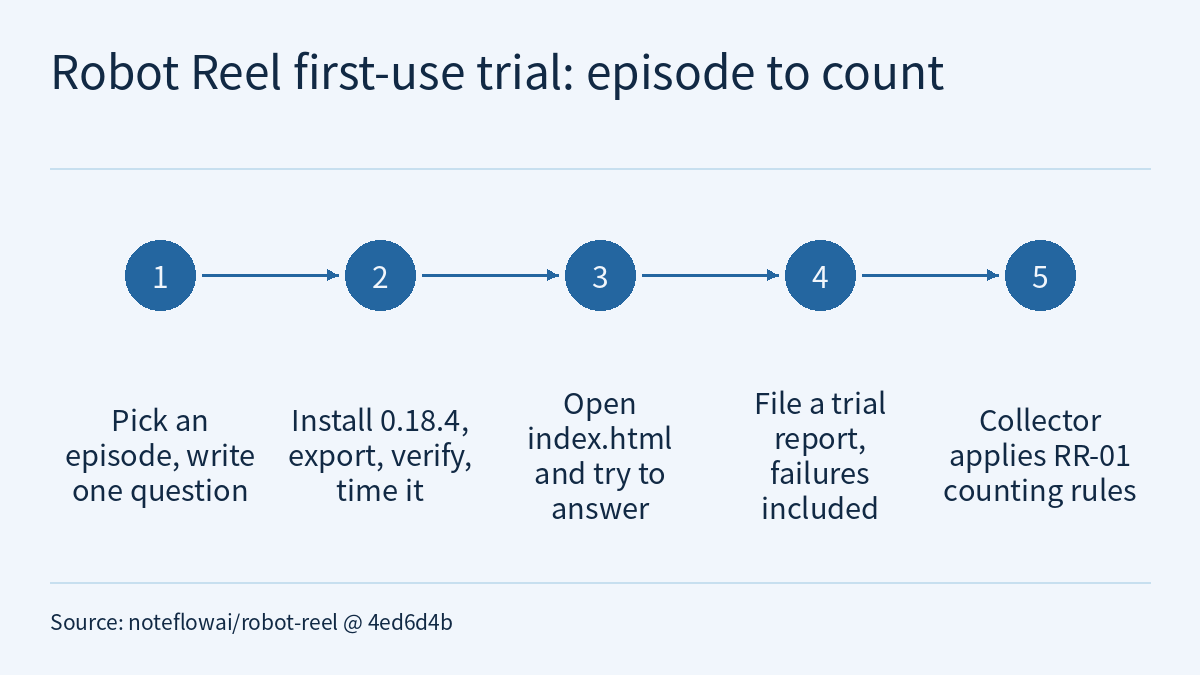
The Robot Reel repository includes a first-use trial guide of about 20 minutes: install, export, verify and open a replay of an episode from your own LeRobotDataset, then file a public report. A companion collector script turns those reports into the progress record for roadmap milestone RR-01 under fixed rules. Working from pinned commit 4ed6d4b, this article explains how to run the trial, how reports are read and counted, and what the record can and cannot tell you. At that commit, the record counts 0 independent trials.
For what Robot Reel is, see Robot Reel: turning robot policy simulations into frame-by-frame verifiable replays and 3D scenes; for another use, checking a model’s explanation, see Checking a model’s explanation against the original robot recording: what Robot Reel’s review-claims can establish. This article covers something else: how to measure whether the tool helps someone using it for the first time.
What RR-01 sets out to measure
The guide states its purpose at the start: to learn whether Robot Reel helps you understand your own robot recording, and where it gets in the way. RR-01 needs first-use attempts by people who are not maintainers. Failed and abandoned attempts count, and the guide asks participants to report them too. According to the guide, Robot Reel runs on your machine, sends no telemetry and writes one folder; you decide what goes into the report.
The collector script hard-codes three targets, which the guide also lists:
- three independent attempts;
- a first useful replay within 15 minutes;
- at least two participants returning with another episode within four weeks.
The guide is explicit that the record shows progress against these targets as reported, “nothing more”. At the pinned commit, every progress entry in docs/validation/external-trials.json is 0, median_minutes_to_first_replay is null, targets_met is false and trials is empty. The only excluded entry is issue 107, with the reason “filed by a repository owner”. The record keeps targets and results apart, and so far it contains only targets.
Write down a question before you install
Before starting, the guide asks you to write down one concrete question: the kind you would normally answer by looking at the recording. Its examples:
- Where does the gripper close later than it was commanded?
- Is the wrist camera in sync with the scene camera?
- At which frame does the arm stop following the command?
The data can be your own LeRobotDataset (v3.0 or v2.x, as a local folder or on the Hub) or any public one. Settling on the question first gives the report’s “did you find it?” a clear yardstick. A trial that only concludes “it looks fine” is hard to compare with what you would normally do.
Install, export and verify, with timings
You need Linux or macOS and Python 3.12 or newer. Replace YOUR/DATASET with a Hub repo id or a local dataset path, and 0 with your episode:
start=$(date +%s)
python3 -m venv rr-trial && . rr-trial/bin/activate
python -m pip install 'robot-reel[lerobot]==0.18.4'
installed=$(date +%s)
robot-reel lerobot YOUR/DATASET --episode 0 --output my-episode
exported=$(date +%s)
robot-reel lerobot my-episode --verify --check-media
echo "install $((installed - start)) s · export $((exported - installed)) s"
Some notes on reading it:
- The install command pins
robot-reel[lerobot]==0.18.4, so this step fixes the version of the tool you run, not just the documentation in the repository. - The two times printed on the last line cover “create the virtual environment and pip install” and “the single
--outputexport command”. The--verify --check-mediacheck that follows is not timed. - Private Hub datasets need
huggingface-cli login(orHF_TOKEN) first. For a local dataset, add--dataset PATHif you also run--check-source. On Windows, note the times by hand. - If any command fails, stop and report the full error message. The guide says plainly that this is a useful result in itself.
Reports are public GitHub issues. Before pasting an error message, we suggest checking it for anything you do not want public, such as tokens, private dataset names or local paths. Keep tokens in an environment variable or the login cache, never in the report. This advice is ours, not the guide’s.
Open the replay and answer your question
Open my-episode/index.html directly in a browser; no server is needed. Note when you first have a replay you can use, then try to answer the question you wrote down. As the guide describes it, the page shows every camera on one clock, along with the language task and each recorded signal. Where action and observation.state share channel names, it overlays command and measurement and links to their largest difference. Questions like “the gripper closes later than commanded” or “the arm stops following the command” are exactly what this overlay view addresses.
The report’s “minutes from starting the install to your first useful replay” starts at the install, so it includes the install and export time from the previous step.
How reports are read and counted
Reports go through the repository’s first-use trial report form, which the guide estimates takes about five minutes. Questions before you start can go to the call for trials discussion; if you would rather not use GitHub, the same questions can be answered in the pinned Hugging Face discussion. A bot replies to each report with what it read from the form and whether the attempt counts. If it misread something, edit the issue to correct it and the reply updates.
scripts/collect_first_use_trials.py uses only the standard library and reads issues labelled first-use-trial. According to the code, a report is not counted if any of the following holds:
- it is a pull request, not a report;
- the author’s association with the repository is
OWNER,MEMBERorCOLLABORATOR; - fewer than two items are ticked under “Confirmation” (the guide says these confirm the author is not a maintainer and agrees to a public summary);
- no answer can be read from “Did the replay open?”.
Note point 4: as long as that field has an answer, an attempt where the replay did not open still counts, consistent with “failed attempts count”. Other answers that are missing or cannot be parsed stay null; the script infers nothing.
A few details in the code affect how to fill in the form and how to read the record:
- Install seconds, export seconds and minutes all take the first number in the answer. A hypothetical example: “about 12 minutes” is read as 12, but “1 hour 10 minutes” is read as 1. It is best to enter the minutes as a single number.
- “Replay opened” counts answers that start with
Yes; “answered the question” counts only answers that are exactlyYes. - The median is the value at position
len // 2after sorting, so when an even number of attempts report a readable minutes value it takes the upper of the two middle values. - In the code, a “returning participant” is a participant with more than one counted report. It checks neither the four-week window nor whether a different episode was used. To check that target, also look at each entry’s
reported_atanddatasetfields. targets_metrequires at least three distinct participants (not just three attempts), at least three attempts within 15 minutes, and at least two returning participants.
Readers who want to check the record themselves can run python3 scripts/collect_first_use_trials.py --check in the repository. It fetches the current issues from GitHub, summarises them again and compares the result with the committed file; if they differ, it prints a message and returns 1, without rewriting the file. Running it without arguments rewrites the record. Setting GITHUB_TOKEN only avoids the anonymous rate limit. Because the comparison is against current issues, the result of --check on the pinned commit depends on whether new reports have arrived since.
Limitations
- This is a public trial guide and a report collector, not evidence of adoption in itself. At pinned commit
4ed6d4bthe record counts 0 independent trials, and the only excluded report was filed by a maintainer. An empty record says nothing about the outcome of any independent trial. - The times, whether the replay opened and whether the answer was found are all self-reported by participants. The script copies them as given; nothing is independently reproduced or measured.
- “Attempts” and “participants” are two separate counts: one person can file several reports, so read
independent_attemptsandindependent_participantsseparately. - “Nothing is uploaded, no telemetry” is the guide’s statement about Robot Reel, and we have not checked it independently. Installing the package and downloading data from the Hub still need network access.
- We did not run the guide’s commands or file a trial report for this article; the replay page’s features are described as the guide states them.
This site’s Physical AI Lab course outline plans hands-on L2 episodes that train policies on LeRobot data; they have not been published yet. Running a trial like this on one of your own episodes first is a way to get familiar with the cameras, commands and state signals in a LeRobotDataset.
Links
- First-use trial guide, docs/first-use-trial.md (pinned commit 4ed6d4b)
- Collector script, scripts/collect_first_use_trials.py (pinned commit)
- Trial record, docs/validation/external-trials.json (pinned commit)
- First-use trial report form
- Call for trials (GitHub Discussions #104)
- Pinned Hugging Face discussion
- Robot Reel: turning robot policy simulations into frame-by-frame verifiable replays and 3D scenes
- Checking a model’s explanation against the original robot recording: what Robot Reel’s review-claims can establish
- Physical AI Lab: a physical AI course where every number can be checked (course outline)